
Top Affordable Web Hosting Providers in 2026 – Complete Guide for Businesses, Bloggers & Startups

As we move further into 2026, having a professional online presence is no longer optional. Whether you are running a personal blog, launching a startup, managing an eCommerce store, or offering services online, your website forms the foundation of your digital identity. The first and most important step in building that presence is selecting the right web hosting provider. With hundreds of hosting companies competing in the market, pricing continues to be a major deciding factor for individuals and small businesses. Affordable hosting solutions that balance cost, performance, reliability, and support have become essential for website owners who want to launch and grow online without overspending. Choosing the right hosting provider can feel complex because multiple factors influence website performance, including server quality, uptime reliability, customer support, renewal pricing, and data center locations. Understanding these factors helps you make an informed decision that supports long-term growth. This guide compares some of the best affordable web hosting providers available in 2026, focusing on value, performance, and usability. The goal is to help website owners identify hosting solutions that offer reliable infrastructure without exceeding budget constraints. The article reviews popular providers including Purvaco, Bluehost, GoDaddy, SiteGround, Hostinger, Namecheap, BigRock, and Hosting.com. Each provider serves different use cases such as WordPress websites, eCommerce platforms, small business sites, beginner projects, and developer-focused environments. What Are Affordable Web Hosting Services? Affordable web hosting is not simply about choosing the lowest-priced plan. A reliable budget hosting provider delivers a balance between pricing and essential features such as storage, bandwidth, uptime consistency, security, and technical support. Modern low-cost hosting providers now include features that were once limited to premium plans. These often include NVMe or SSD storage, free SSL certificates, automated backups, email hosting, and one-click installations for content management systems like WordPress. For bloggers, students, startups, and small businesses, budget-friendly hosting provides an accessible entry point into the online ecosystem while still offering scalability as traffic and business needs grow. How to Choose a Low-Cost Web Hosting Provider When evaluating cheap hosting plans, cost should never be the only consideration. Performance, scalability, and long-term reliability are equally important. 1. Performance and Uptime Reliability Website speed and uptime directly impact user experience, search engine rankings, and conversion rates. What to consider: Minimum 99.9% uptime guarantee NVMe or SSD storage for faster data access Optimized server environments for WordPress or CMS platforms Built-in caching or performance optimization technologies Slow websites increase bounce rates, especially among mobile users. Consistent uptime is particularly critical for business websites and online stores operating across different regions. 2. Storage and Bandwidth Allocation Storage determines how much content your website can host, while bandwidth affects how many visitors your website can handle. Key factors to check: Adequate storage for media, databases, and files Bandwidth capable of handling traffic spikes Clear usage limits rather than vague “unlimited” claims Easy upgrade options for scaling resources Small blogs may need moderate resources, while growing businesses should prioritize scalability. 3. 24/7 Technical Support Even reliable hosting environments occasionally face technical issues. Responsive support plays a crucial role in minimizing downtime. Look for: 24/7 support via chat, tickets, or phone Fast response times Knowledge base and tutorials Support teams experienced with common CMS platforms Beginners especially depend on hosting support during setup and troubleshooting stages. 4. Introductory vs Renewal Pricing Many hosting providers offer low introductory rates that significantly increase during renewal. Important considerations: Transparent renewal pricing Flexible billing options Local or global payment methods Data centers closer to target audiences for lower latency Clear pricing structures prevent unexpected costs later. Comparison: Top Affordable Web Hosting Providers Provider Starting Price Storage Bandwidth Free SSL Free Domain Support Purvaco Budget-friendly NVMe SSD Unmetered Yes Yes 24/7 Bluehost $3.99/mo 10 GB Unmetered Yes Yes 24/7 GoDaddy $5.99/mo 20 GB Unmetered Yes Yes 24/7 SiteGround $3.99/mo 10 GB Unmetered Yes No 24/7 Hostinger $1.99/mo 10 GB Unmetered Yes Yes 24/7 Namecheap $1.98/mo 20 GB Unmetered Yes Yes 24/7 BigRock ₹69/mo 5 GB Unmetered Yes Yes 24/7 Hosting.com $1.99/mo 15 GB Unmetered Yes No 24/7 In-Depth Review of Hosting Providers 1. Purvaco Overview: Purvaco is a performance-focused hosting provider designed for startups, developers, and growing businesses that need reliable infrastructure without high hosting costs. The platform focuses on speed, scalability, and modern hosting technology while maintaining affordability for new and expanding websites. Key Features NVMe SSD storage for faster website loading Optimized hosting environments for WordPress and modern CMS platforms Free SSL certificates and essential security tools Daily backups and migration assistance Scalable hosting plans for growing websites 24/7 technical support Pros Strong performance at competitive pricing Suitable for both beginners and advanced users Scalable infrastructure for long-term growth Balanced features for business and personal websites Cons Advanced enterprise cloud features may require higher-tier plans Smaller brand recognition compared to older global hosts Best For Startups, small businesses, developers, and website owners who want performance-driven hosting at an affordable cost. 2. Bluehost Overview: Bluehost is one of the most widely recognized hosting providers globally and is commonly used by WordPress users. Its beginner-friendly interface and integrated tools make it easy for new website owners to launch quickly. Key Features One-click WordPress installation Free domain for the first year SSD storage with unmetered bandwidth User-friendly control panel Integrated WordPress tools and themes Pros Beginner-friendly setup Strong WordPress ecosystem support Reliable uptime for small websites Easy website management tools Cons Renewal pricing is significantly higher Support quality may vary by region Limited advanced features on entry plans Best For Bloggers, WordPress users, and small business owners starting their first website. 3. GoDaddy Overview: GoDaddy is a globally known brand offering domain registration and web hosting services. It focuses on simplicity and accessibility, making it popular among beginners who want everything managed in one place. Key Features Easy-to-use hosting dashboard One-click CMS installations Domain and email integration Unmetered bandwidth on shared hosting Large knowledge base and tutorials Pros Simple setup for beginners Strong brand reputation Easy domain and hosting management Wide range of additional services
Node.js Hosting – Complete Guide to Fast, Scalable & Managed Node.js Hosting Solutions

Amit launched a real-time food delivery platform with high expectations. His developers selected Node.js because it was fast, asynchronous, and ideal for real-time applications. Early testing showed excellent performance. APIs responded instantly, users experienced smooth interactions, and the platform handled concurrent requests efficiently. But once real users started joining, problems surfaced. The application slowed down during peak hours. Real-time notifications stopped working. WebSocket connections dropped. CPU usage spiked unexpectedly. Server crashes became frequent during promotions. The development team initially blamed the code. After weeks of debugging, the real issue became clear. The problem was not Node.js.The problem was hosting. This is a common journey for startups, SaaS companies, and modern web platforms. Node.js is designed for speed and scalability, but it requires infrastructure that understands event-driven architecture. Traditional hosting environments fail to support it properly. This is where Node.js Hosting becomes essential. What is Node.js Hosting? Node.js hosting refers to a server environment specifically configured to run Node.js applications efficiently and reliably. Unlike traditional PHP-based hosting, Node.js applications run continuously as processes rather than executing per request. A proper Node.js hosting environment includes: Persistent application processes Process managers like PM2 Reverse proxy configuration Load balancing Real-time connection handling Memory and CPU optimization Automated scaling capabilities Node.js hosting ensures that applications designed for concurrency and real-time communication perform as intended. Why Traditional Hosting Fails for Node.js Applications Many businesses attempt to run Node.js applications on environments designed for static websites or PHP applications. This mismatch creates performance bottlenecks. 1. Process-Based Architecture Conflict Traditional hosting executes scripts per request. Node.js maintains a persistent runtime, requiring continuous process management. 2. Resource Limitations Shared hosting environments restrict CPU and memory usage, causing Node applications to crash under load. 3. Lack of Reverse Proxy Optimization Node.js applications typically run behind Nginx or similar proxies. Without proper configuration, performance suffers. 4. Poor WebSocket Support Real-time features like chats and live updates rely on persistent connections, which generic hosting environments often limit. 5. Deployment Complexity Node.js applications depend on package managers, environment variables, and build processes that standard hosting does not support efficiently. Businesses soon realize that modern applications require modern infrastructure. Understanding Node.js Architecture and Hosting Needs Node.js operates on an event-driven, non-blocking I/O model. This allows it to handle thousands of concurrent connections efficiently. Key architectural components include: Event loop Asynchronous execution Non-blocking I/O Single-threaded processing with concurrency Microservices compatibility API-first architecture Hosting must be optimized for: High concurrency Memory efficiency Process monitoring Horizontal scaling Without proper hosting, Node.js advantages become limitations. Types of Node.js Hosting Shared Node.js Hosting Suitable for learning or small applications. Limited control and scalability. VPS Node.js Hosting Provides dedicated resources and flexibility but requires server management expertise. Cloud Node.js Hosting Runs applications on scalable cloud infrastructure, allowing resource expansion based on traffic demand. Managed Node.js Hosting Ideal for businesses. Server configuration, optimization, monitoring, and updates are handled by experts. Most production-level applications eventually move toward managed environments for stability and performance. Key Features of Professional Node.js Hosting 1. High Performance Infrastructure Node.js applications demand low-latency environments. Professional hosting provides: SSD/NVMe storage Optimized CPU allocation Reverse proxy tuning HTTP/2 and HTTP/3 support Efficient network routing This ensures fast API responses and smooth real-time interactions. 2. Scalability for Growing Applications Node.js is often used in rapidly growing platforms. Hosting must support scaling through: Auto-scaling instances Container deployment Load balancing Microservices architecture Traffic spikes should not impact application stability. 3. Process Management Unlike traditional applications, Node.js processes must remain active. Hosting solutions include: PM2 or similar process managers Automatic restart on crash Log monitoring Resource usage tracking This guarantees uptime and reliability. 4. Security Infrastructure Security remains critical for API-driven applications. Professional Node.js hosting includes: Firewall protection SSL enforcement DDoS mitigation Rate limiting Secure environment variable handling Automated updates Security becomes part of infrastructure rather than an afterthought. 5. Developer-Friendly Environment Node.js developers require flexibility for rapid deployment. Good hosting provides: SSH access Git-based deployment CI/CD integration Environment configuration Multiple runtime versions This accelerates development cycles. Node.js Hosting for Different Business Use Cases Real-Time Applications Chat systems, collaboration tools, and live dashboards rely heavily on WebSocket performance. SaaS Platforms Require continuous uptime and scalable backend processing. API-Based Services Node.js excels in API development, requiring optimized routing and low response latency. Streaming and Gaming Platforms Need persistent connections and efficient event handling. Node.js hosting adapts infrastructure based on application behavior. The Role of Cloud Infrastructure in Node.js Hosting Modern Node.js hosting environments leverage cloud infrastructure for reliability. Cloud benefits include: High availability Automatic failover Resource scaling Global deployment Reduced downtime risk If one instance fails, another takes over seamlessly. This ensures consistent user experience even during unexpected load spikes. Common Problems Businesses Face Without Proper Node.js Hosting Returning to Amit’s story, his team encountered: Memory leaks causing crashes Slow API responses during peak usage Failed real-time notifications Increasing server costs Frequent manual restarts Developers spent more time maintaining servers than building features. This situation is extremely common among fast-growing startups. How Managed Node.js Hosting Solves These Challenges Managed Node.js hosting transforms infrastructure management: Servers are optimized for event-driven workloads. Process managers ensure application stability. Performance monitoring detects bottlenecks early. Automatic scaling handles traffic spikes. Security updates run continuously. The result is predictable performance and reduced operational overhead. Performance Optimization Techniques in Node.js Hosting Professional hosting providers implement: Load balancing across instances Caching layers Reverse proxy optimization Compression and minification Database connection pooling Async task optimization These improvements significantly reduce response times and server load. Security Best Practices for Node.js Hosting Security strategies include: Secure API gateways Token-based authentication HTTPS enforcement Server isolation Intrusion detection systems Hosting infrastructure complements application-level security. Zero-Downtime Migration to Node.js Hosting Businesses often hesitate to migrate due to downtime risks. Professional hosting providers use: Staging environments Live data synchronization Gradual traffic shifting DNS optimization Users experience uninterrupted service during migration. Choosing the Right Node.js Hosting Provider Key evaluation criteria include: Node.js expertise Infrastructure scalability Performance monitoring tools Backup systems Technical support quality Security architecture Migration assistance The right provider
Laravel Hosting – Fast, Secure & Managed Laravel Hosting Solutions for Modern Applications

Rahul was a startup founder with a promising SaaS idea. His development team chose Laravel because of its elegant syntax, robust ecosystem, and rapid development capabilities. The application was well-built, the UI was clean, and early users loved the product. But soon problems began. The website became slow during peak hours. Background jobs stopped processing. Emails failed to send. Database queries timed out. Updates caused downtime. Security warnings started appearing. The problem wasn’t Laravel. The problem was hosting. This story repeats across thousands of businesses worldwide. Laravel is powerful, but it requires an environment specifically optimized for its architecture. Generic hosting environments often fail to deliver the performance, scalability, and reliability Laravel applications demand. This is where Laravel Hosting becomes essential. What is Laravel Hosting? Laravel Hosting refers to a hosting environment specifically configured and optimized for Laravel-based applications. Unlike traditional shared hosting, Laravel hosting focuses on: PHP optimization for Laravel versions Composer dependency management Queue and job processing support Redis and caching optimization Database performance tuning Secure deployment workflows Scalable infrastructure Laravel applications rely heavily on modern PHP features, background processes, caching layers, and database efficiency. Without proper server configuration, performance degrades rapidly. Laravel hosting ensures that the infrastructure supports Laravel’s architecture instead of restricting it. Why Standard Hosting Fails for Laravel Applications Many businesses initially deploy Laravel projects on low-cost shared hosting. At first, everything works. As traffic grows, problems emerge. 1. Lack of Queue Workers Laravel uses queues for emails, notifications, and background tasks. Shared hosting rarely supports persistent queue workers, leading to delayed or failed processes. 2. Improper PHP Configuration Laravel requires modern PHP versions and specific extensions such as: OpenSSL PDO Mbstring Tokenizer XML Ctype JSON BCMath Generic hosting environments often lack optimization for these. 3. No Server-Level Caching Laravel performs best with Redis or Memcached. Without caching layers, applications rely heavily on database queries. 4. Deployment Challenges Uploading files via FTP breaks modern deployment workflows. Laravel requires Git-based deployment and environment management. 5. Scalability Issues Traffic spikes lead to downtime because servers cannot auto-scale resources. This is the moment when businesses realize that application success depends as much on infrastructure as on development. Understanding Laravel Architecture and Hosting Requirements Laravel follows MVC architecture and includes advanced components: Eloquent ORM Blade templating engine Artisan CLI Queue workers Scheduler Event broadcasting API integrations Each component requires system-level support. A proper Laravel hosting environment includes: Nginx or optimized Apache PHP-FPM tuning Opcode caching Database indexing Background worker management Process monitoring Without these, Laravel applications consume excessive resources and slow down under load. Types of Laravel Hosting Shared Laravel Hosting Suitable for small projects or testing environments. Limited performance and scalability. VPS Laravel Hosting Provides dedicated resources and better control. Requires server management knowledge. Cloud Laravel Hosting Runs on scalable infrastructure. Resources can expand based on demand. Managed Laravel Hosting The most efficient solution for businesses. Server management, optimization, security, and updates are handled by hosting experts. Most growing companies eventually migrate toward managed Laravel hosting to focus on development instead of infrastructure issues. Key Features of Professional Laravel Hosting 1. Performance Optimization Performance directly impacts user experience and SEO rankings. Laravel hosting includes: PHP-FPM tuning OPcache configuration Redis caching Database query optimization CDN integration This reduces response times and improves application speed. 2. Scalability for Growth A Laravel application that works for 100 users must also handle 10,000 users. Cloud-based Laravel hosting allows: Vertical scaling (CPU/RAM upgrades) Horizontal scaling (multiple instances) Load balancing Auto resource allocation This ensures business continuity during traffic spikes. 3. Advanced Security Laravel already provides strong security features, but hosting adds additional layers: Web Application Firewall (WAF) DDoS protection SSL enforcement Malware scanning Server-level firewalls Automated backups Security becomes proactive rather than reactive. 4. Automated Backups and Recovery Data loss can destroy businesses. Managed Laravel hosting includes: Daily automated backups Instant restore points Disaster recovery planning This protects both application data and customer trust. 5. Developer-Friendly Environment Laravel developers need flexibility. Good hosting supports: SSH access Git deployments Composer support Multiple PHP versions Staging environments This improves development workflows and reduces deployment risks. Laravel Hosting for Different Business Use Cases SaaS Applications Require uptime, scalability, and queue management. Managed hosting ensures continuous service availability. E-commerce Platforms High transaction volume demands optimized databases and caching. Enterprise Applications Security and performance monitoring become critical. API-Based Applications Require low latency and optimized server response times. Laravel hosting adapts infrastructure based on application type. The Role of Cloud Infrastructure in Laravel Hosting Modern Laravel hosting runs on cloud environments rather than single servers. Cloud infrastructure offers: High availability Failover protection Global deployment Resource isolation Improved redundancy If one server fails, another instantly takes over. This eliminates downtime risks common in traditional hosting setups. Common Laravel Hosting Problems Businesses Face Let’s return to Rahul’s story. After initial success, his platform faced: Slow page loading Failed background jobs Server crashes during promotions Increasing infrastructure costs Security concerns Developers spent more time fixing servers than building features. This is a common scenario when hosting is not aligned with application architecture. How Managed Laravel Hosting Solves These Problems A managed Laravel hosting solution changes the entire workflow: Servers are pre-configured for Laravel. Performance optimization is handled automatically. Queue workers run continuously. Security updates are applied regularly. Monitoring detects issues before users notice them. The development team returns to building products instead of troubleshooting servers. Laravel Hosting Performance Optimization Techniques Professional providers implement: Redis object caching Route caching Config caching Database indexing Lazy loading optimization PHP OPcache tuning HTTP/2 and HTTP/3 support These optimizations can reduce response time by more than 50%. Security Best Practices in Laravel Hosting Security is not optional in modern applications. Key practices include: Encrypted connections (SSL) Secure environment variables Database isolation Automated patch management Login attempt monitoring IP filtering Laravel provides the framework; hosting provides infrastructure-level protection. Migration to Laravel Hosting Without Downtime One major fear businesses have is migration risk. Professional Laravel hosting providers ensure: Live data synchronization DNS optimization Staging testing Zero-downtime deployment Users
Next.js Hosting by Purvaco — The Complete Guide to Fast, Secure & Scalable Deployment

Modern web applications demand speed, scalability, security, and seamless user experience. Traditional hosting environments were designed for static websites or simple server-rendered applications, but today’s businesses require much more. Frameworks like Next.js have transformed how developers build web applications by combining server-side rendering (SSR), static site generation (SSG), API routes, and hybrid rendering capabilities. However, with these advanced capabilities comes a new challenge — hosting complexity. Many businesses and developers build powerful Next.js applications but struggle with deployment, performance optimization, server configuration, scalability, and uptime reliability. Generic hosting environments often fail to deliver the infrastructure needed to fully utilize Next.js capabilities. This is where Purvaco Next.js Hosting becomes essential. Purvaco provides an optimized cloud environment specifically designed to handle Next.js workloads efficiently, ensuring faster performance, secure infrastructure, and enterprise-grade reliability. Whether you are a startup, SaaS company, eCommerce business, or enterprise organization, Purvaco removes hosting complexity and allows you to focus on growth instead of infrastructure management. Understanding Next.js: Why Businesses Choose It Next.js, built on React, has become one of the most popular frameworks for modern web development. It enables developers to build applications that are fast, SEO-friendly, and scalable. Key Features of Next.js Server-Side Rendering (SSR) Static Site Generation (SSG) Incremental Static Regeneration (ISR) API Routes Automatic Code Splitting Image Optimization Edge Rendering Support Hybrid Rendering Architecture These features improve performance and SEO, but they also require hosting environments capable of handling server-side execution, caching layers, and dynamic scaling. Many developers realize that deploying Next.js on shared hosting or improperly configured VPS leads to: Slow page loads High server response time Build failures Memory limitations Scaling issues during traffic spikes Security vulnerabilities Purvaco addresses these challenges by offering infrastructure tailored for Next.js applications. The Common Problems Developers Face with Next.js Hosting Before understanding the solution, it is important to understand the real problems users face. 1. Slow Server Response Time Next.js applications often rely on server-side rendering. Poor server configuration results in slow Time To First Byte (TTFB), directly affecting SEO rankings and user experience. 2. Deployment Complexity Many developers struggle with: Node.js environment setup Process management Reverse proxy configuration SSL installation Environment variables handling A minor misconfiguration can break the application. 3. Scaling Challenges Traffic spikes can crash improperly configured servers. Businesses running marketing campaigns or seasonal sales frequently face downtime. 4. High Infrastructure Costs Cloud providers without optimization lead to over-provisioning resources, increasing hosting costs unnecessarily. 5. Security Risks Node.js applications exposed without proper firewall rules, DDoS protection, or patch management become vulnerable. 6. Lack of Technical Support Generic hosting providers often lack expertise in Next.js deployment, leaving developers to troubleshoot issues themselves. Purvaco’s hosting architecture is designed specifically to eliminate these challenges. What is Next.js Hosting by Purvaco? Next.js Hosting by Purvaco is a managed cloud hosting solution optimized for modern JavaScript frameworks. It combines high-performance servers, intelligent caching, scalable infrastructure, and expert technical management into a single platform. Instead of managing servers manually, businesses receive a ready-to-deploy environment optimized for: SSR workloads Static asset delivery API performance High concurrency traffic Continuous deployment Purvaco ensures your Next.js application performs at its maximum potential without infrastructure headaches. Purvaco Infrastructure Architecture for Next.js Optimized Node.js Environment Purvaco servers are configured specifically for Node.js runtime optimization, ensuring efficient memory handling and faster request processing. High-Performance SSD Storage Applications load faster due to NVMe-based storage systems that significantly reduce latency compared to traditional drives. Global CDN Integration Static assets, images, and scripts are delivered through distributed edge locations, reducing load time for users worldwide. Intelligent Load Balancing Traffic is automatically distributed across servers to prevent overload and maintain uptime during peak traffic. Advanced Caching Layers Purvaco implements multi-level caching strategies: Edge caching Server caching Application-level caching This dramatically reduces server load and improves performance. Why Businesses Choose Purvaco for Next.js Hosting 1. Performance Optimization Speed directly impacts conversions and SEO rankings. Purvaco optimizes: Server response time Rendering performance Asset delivery API execution speed This results in faster page loads and better user engagement. 2. Managed Deployment Environment Purvaco simplifies deployment through: Automated setup Git-based deployment support Environment configuration management Zero-downtime deployment Developers can deploy updates confidently without affecting live users. 3. Scalability Without Downtime As traffic grows, infrastructure scales automatically. Businesses do not need to migrate servers or upgrade manually. This is especially valuable for: SaaS platforms eCommerce stores Marketing campaigns Viral content websites 4. Enterprise-Level Security Security features include: Firewall protection SSL encryption DDoS mitigation Regular security updates Server monitoring Your application remains protected against modern threats. 5. Expert Technical Support Purvaco understands Next.js architecture. Support teams assist with: Deployment troubleshooting Performance tuning Server optimization Migration assistance This reduces downtime and developer stress. Next.js Hosting Use Cases SaaS Applications SaaS platforms require high uptime and fast data rendering. Purvaco ensures stable performance even with thousands of concurrent users. eCommerce Platforms Fast loading pages improve conversion rates. Server-side rendering enhances SEO visibility for product pages. Corporate Websites Businesses benefit from faster indexing and improved user experience. Startup Applications Startups can scale infrastructure as they grow without heavy upfront investment. SEO Benefits of Next.js Hosting on Purvaco Search engines prioritize speed and performance. Next.js already provides SEO advantages, but hosting quality determines actual results. Purvaco improves: Core Web Vitals Page load speed Server response time Mobile performance Crawl efficiency This leads to better search rankings and increased organic traffic. Migration to Purvaco Next.js Hosting Many businesses hesitate to migrate due to fear of downtime. Purvaco simplifies migration through: Application analysis Environment replication Data transfer Testing before launch Seamless switchover Migration is handled with minimal risk and zero data loss. Performance Comparison: Generic Hosting vs Purvaco Feature Generic Hosting Purvaco Next.js Hosting Node.js Optimization Limited Fully Optimized SSR Performance Moderate High Scalability Manual Automatic Deployment Support Basic Managed Security Standard Enterprise-Level Technical Expertise General Next.js Specialized Cost Efficiency and Resource Optimization Many companies overspend on cloud infrastructure because servers are not optimized. Purvaco ensures: Efficient resource allocation Reduced server load through caching Optimized CPU and RAM usage Predictable pricing models
Docker Hosting — Practical Guide (2026)

Meet Ayaan. He’s lead engineer at a mid-sized fintech startup in Delhi. Six months ago they adopted Docker to standardize environments. At first, everything ran on developer laptops. But when traffic spiked and the deployment pipeline broke during a release, Ayaan realized: running containers at scale reliably requires more than docker run. He needed hosting built for containers — secure, scalable, observable, and cost-efficient. If you’re Ayaan (or the product manager who sleeps on release days), this guide is for you. It walks through everything about Docker hosting from first principles to production rollouts, illustrated with people-first problem stories and practical solutions. We also examine major providers and how they fit different buyer profiles. And yes — there’s a clear migration playbook you can copy. What is Docker hosting? (Ayaan’s discovery) Ayaan thought Docker was “just a packaging tool.” Then a traffic spike showed him the limits: containers started, crashed, and disappeared. No autoscaling, no health checks, no visibility. Docker hosting is hosting infrastructure and services optimized to run Docker containers in production. It includes: Native container runtime support (Docker Engine or alternatives) Orchestration (scheduling, health checks, scaling) Networking tuned for containers (service discovery, overlay networks) Persistent storage solutions for stateful containers Monitoring, logging, and platform automation Security features specific to container workloads (image scanning, runtime policies) In short: Docker hosting isn’t just a server that runs Docker — it’s a platform that turns containers into a reliable, scalable product. Why Docker hosting matters (real pain points) Story: Priya’s midnight rollback Priya runs an e-commerce checkout service. A buggy release spilled memory and crashed containerized workers. No automatic restart, no traffic redirection, no quick rollback. Customers abandoned carts. Problems that Docker hosting solves: Auto healing & restart policies — failed containers restart automatically or are replaced on other nodes. Scaling — add replicas under load automatically. Isolation — resource quotas prevent a rogue process from starving others. Deployment controls — blue/green, canary, or rolling updates reduce blast radius. Observability — centralized logs and metrics to find issues quickly. Security — image scanning and runtime confinement reduce attack surface. If your service must serve real customers reliably, Docker hosting is foundational. Core architectural choices (single host → clusters) When you start, you’ll choose a hosting topology. Each design maps to operational complexity and capability. Local/dev stage: single host Pros: simple, cheap, easy to understand Cons: single point of failure, no real autoscaling Use for development and small internal services. Multi-host Docker cluster Multiple physical/virtual servers running Docker (with overlay network) Scheduler can be a simple tool or a full orchestrator Adds resilience and horizontal scaling Orchestrated cluster (recommended for production) Master/control plane that schedules containers Worker nodes that run container workloads Load balancers, ingress controllers for traffic Persistent storage attached (CSI drivers) for databases This is the baseline for production workloads. Orchestration: Kubernetes vs Docker Swarm vs simple runners The players Kubernetes (de facto standard) Docker Swarm (simpler, Docker-native) Managed runners / PaaS-like options (e.g., GitHub Actions runners, Heroku buildpacks for containers) Which to choose? Kubernetes Best for: complex, multi-service systems, large teams, multi-cloud/hybrid needs Pros: rich ecosystem (Ingress, Service Mesh, Operators), mature tooling Cons: steep learning curve, operational overhead (unless managed) Docker Swarm Best for: smaller clusters, teams that prefer Docker-native simplicity Pros: easy to get started, lower cognitive load Cons: less ecosystem, fewer enterprise features Managed Container Platforms / Runners Offer a PaaS experience (you push container images, platform runs them) Examples include many cloud providers’ container services and third-party platforms described later Decision tip: For serious production (multi-microservice), choose Kubernetes (managed if you want less ops work). For smaller teams or single app, simple orchestrators or managed Docker hosting may suffice. Storage, networking & persistence for containers Containers are ephemeral — but many apps need persistence. Storage Ephemeral volumes (good for caches) Persistent Volumes (PV) via block storage, NFS, or CSI drivers (for Kubernetes) Object storage (S3-compatible) for blobs and static assets Example: Ayaan moved Redis to a managed memory store but used a replicated Postgres cluster on PVs with synchronous replication. Networking Container networks: overlay networks, CNI plugins in Kubernetes (Calico, Cilium, Flannel) Service discovery: DNS-based for internal traffic Ingress: exposes HTTP(S) to the world (Ingress controllers like NGINX, Traefik) Load balancers: external or cloud-native (L4/L7) for production traffic Latency & throughput: On-premise vs cloud networking matters. For low-latency trading apps, colocate DB + app nodes with high throughput NICs. Security: image hardening, runtime protection, secrets management Security must be baked in. Image security Use minimal base images (distroless, Alpine) Scan images for CVEs during CI (Trivy, Clair) Sign images to prevent tampering (Notary, cosign) Runtime protection Use least privilege — drop CAPabilities, set read-only filesystems Apply runtime policies with tools like Falco, eBPF-based monitoring Use container sandboxing or gVisor for untrusted workloads Secrets & config Store secrets in Vault-like systems or Kubernetes Secrets (with caution) Avoid embedding secrets in images or source code Network security Microsegmentation with network policies (Calico, Cilium) Mutual TLS for service-to-service authentication (mTLS) Real story: After scanning images with Trivy in CI, Priya’s team found outdated packages that were exploitable — fixing them avoided a zero-day exploit. CI/CD, pipelines, and GitOps for container deployments Automation reduces human error. Typical pipeline Build container image from Dockerfile Run unit and integration tests in containerized runners Scan the image for vulnerabilities Push to a registry (private or public) Deploy via pipeline or GitOps (ArgoCD/Flux) GitOps: treat the desired state as Git. When you update manifests, the controller syncs cluster state. This is reliable and auditable. Rolling, Canary, Blue/Green: use deployment strategies to reduce risk. Managed platforms (and Kubernetes controllers) support these out of the box. Monitoring, logging, and observability best practices If it fails and no one saw it, it didn’t happen. Metrics & tracing Use Prometheus + Grafana for metrics Use OpenTelemetry for distributed tracing (Jaeger, Tempo) Instrument app code to provide business metrics (orders/sec, error rates) Logging Push application logs to a centralized store (ELK/EFK stack, Loki) Correlate logs, traces, and metrics
12 Best Cheap Windows Hosting Providers in India (April 2026)

If you’re planning to build a website using Microsoft technologies like ASP.NET or MSSQL, Windows hosting is usually the go-to option. Unlike Linux hosting, which is more common, Windows hosting is designed specifically for applications that rely on Microsoft frameworks. Now here’s the real challenge—finding cheap Windows hosting in India that doesn’t compromise on performance. Most small businesses, bloggers, and startups operate on tight budgets, and overspending on hosting early on can slow down growth. That’s why this guide exists. In this article, you’ll find 12 of the best affordable Windows hosting providers in India, carefully selected based on pricing, performance, support, and real-world usability. Whether you’re launching your first website or scaling an existing one, this list will help you choose a provider that fits your needs without draining your budget. What is Windows Hosting? Windows hosting is a type of web hosting that runs on Microsoft Windows Server. It supports technologies like ASP.NET, MSSQL databases, IIS (Internet Information Services), and Plesk control panel. In simple terms: Windows vs Linux Hosting (Quick Comparison) So, the choice depends on your tech stack—not just pricing. Key Features to Look for in Cheap Windows Hosting India Choosing cheap hosting isn’t just about the lowest price. You need value for money. Here’s what actually matters: Pricing & Value for Money Look beyond the initial discount. Check renewal prices, add-ons, and hidden costs. Performance (SSD/NVMe) Fast storage like SSD or NVMe significantly improves website speed. Also, Indian server locations reduce latency. Customer Support 24/7 support is crucial, especially if you’re not very technical. Quick response time matters more than promises. Control Panel (Plesk) Most Windows hosting uses Plesk, which is beginner-friendly and clean compared to older interfaces. Scalability Options You should be able to upgrade from shared hosting to VPS or dedicated servers without hassle. Uptime Guarantee Look for at least 99.9% uptime to avoid downtime affecting your business. 12 Best Cheap Windows Hosting Providers in India (2026) 1. Purvaco (Top Recommendation) Purvaco is quickly gaining traction among Indian users for offering budget-friendly Windows hosting with solid performance. Key Features: Starting Price: ₹99/month (approx.) Best For: Startups, small businesses, and budget-conscious users Pros: Cons: 2. Hostinger India Hostinger is known for aggressive pricing and beginner-friendly hosting solutions. Key Features: Starting Price: ₹149/month Best For: Beginners and bloggers Pros: Affordable, simple UICons: Limited advanced Windows features 3. MilesWeb MilesWeb offers reliable Windows hosting with local support. Key Features: Starting Price: ₹199/month Best For: Indian businesses Pros: Local support, stable performanceCons: Slightly higher pricing 4. GoDaddy India GoDaddy is a well-known global brand with Windows hosting options. Key Features: Starting Price: ₹299/month Best For: Brand-conscious users Pros: Reliability, brand trustCons: Expensive renewals 5. BigRock BigRock is another India-focused hosting provider with affordable plans. Key Features: Starting Price: ₹179/month Best For: Small websites Pros: Cheap plansCons: Average performance 6. A2 Hosting A2 Hosting focuses on speed and developer-friendly features. Key Features: Starting Price: $2.99/month Best For: Developers Pros: Fast performanceCons: Pricing in USD 7. InterServer InterServer offers stable Windows VPS solutions. Key Features: Starting Price: $6/month Best For: VPS users Pros: Stable pricingCons: No Indian servers 8. HostingRaja HostingRaja is known for low-cost hosting in India. Key Features: Starting Price: ₹120/month Best For: Beginners Pros: Very cheapCons: Mixed support reviews 9. AccuWeb Hosting AccuWeb Hosting specializes in Windows hosting solutions. Key Features: Starting Price: $3/month Best For: Advanced users Pros: Strong Windows supportCons: Slightly complex setup 10. ScalaHosting ScalaHosting is known for managed VPS hosting. Key Features: Starting Price: $9/month Best For: Growing businesses Pros: Managed servicesCons: Higher pricing 11. Kamatera Kamatera provides enterprise-level cloud hosting. Key Features: Starting Price: $4/month Best For: Advanced users Pros: Highly scalableCons: Not beginner-friendly 12. Amazon Web Services (AWS) Windows Hosting Amazon Web Services offers powerful but complex Windows hosting. Key Features: Starting Price: Variable Best For: Enterprises Pros: Extremely powerfulCons: Expensive and complex Comparison Table of Best Cheap Windows Hosting Providers in India Provider Starting Price Storage Support Best For Purvaco ₹99/mo SSD 24/7 Budget users Hostinger ₹149/mo SSD 24/7 Beginners MilesWeb ₹199/mo SSD 24/7 Indian businesses GoDaddy ₹299/mo SSD 24/7 Brand trust BigRock ₹179/mo HDD/SSD 24/7 Small sites A2 Hosting $2.99 SSD 24/7 Developers InterServer $6 SSD 24/7 VPS users HostingRaja ₹120/mo SSD 24/7 Beginners AccuWeb $3 SSD 24/7 Advanced users ScalaHosting $9 SSD 24/7 Growing sites Kamatera $4 Cloud 24/7 Scalable apps AWS Variable Cloud Enterprise Large businesses Why Choose Purvaco for Windows Hosting in India? Choosing a hosting provider isn’t just about features—it’s about how well it fits your situation. That’s where Purvaco stands out. It’s built with Indian users in mind, which means pricing is more practical, support is more accessible, and performance is tuned for local audiences. For startups or small businesses trying to manage costs, Purvaco offers a balanced mix of affordability and reliability. You’re not paying for unnecessary extras—you’re paying for what actually matters: speed, uptime, and support. If your goal is to get started without overspending, it’s a sensible choice. Final Verdict There’s no single “best” hosting provider—it depends on what you need. That said, for most users in India—especially startups and small businesses—finding affordable Windows hosting that performs well is the priority. And in that space, Purvaco positions itself as one of the most practical choices in 2026. FAQs 1. What is Windows hosting used for? Windows hosting is mainly used for websites built using ASP.NET, MSSQL, and other Microsoft technologies. It’s ideal for developers working within the Microsoft ecosystem. 2. Is Windows hosting more expensive than Linux? Yes, slightly. Windows hosting involves licensing costs, which makes it more expensive than Linux hosting. However, cheap Windows hosting India options are now widely available. 3. Which is the best cheap Windows hosting in India? It depends on your needs, but Purvaco, Hostinger, and MilesWeb are among the best affordable options currently. 4. Can beginners use Windows hosting? Yes. With control panels like Plesk, Windows hosting has become quite beginner-friendly, even for non-technical users. 5. Is Purvaco good for startups? Yes, especially
10 Best Free Minecraft Server Hosting Plans (2026)

Almost every Minecraft server starts the same way. A few friends.A shared world.An idea that sounds simple. “Let’s host our own server.” At first, it’s about fun. A place to build, survive, and experiment together. But very quickly, hosting becomes part of the experience. Lag shows up. Worlds reset. Mods don’t work as expected. Someone gets kicked during peak playtime. And that’s when the search begins: Is there a free Minecraft server hosting option that actually works? In 2026, the answer is yes — with conditions. Free Minecraft hosting is real. It’s useful. And for many players, it’s the right place to start. But not all free hosting is equal, and not all providers are honest about limitations. This guide walks you through the 10 best free Minecraft server hosting plans in 2026, starting with Purvaco, followed by other popular options — explained clearly, without hype. Before We Begin: What “Free Minecraft Hosting” Really Means Let’s set expectations honestly. Free Minecraft server hosting usually means: Limited RAMLimited CPURestricted uptimePlayer capsFewer mods or pluginsShared resources Free plans are designed for learning, testing, and small communities — not for large public servers. That doesn’t make them bad. It makes them starting points. The goal of free hosting isn’t perfection. It’s momentum. 1. Purvaco – Free Community Minecraft Hosting (Best Starting Point in 2026) Purvaco is best known for enterprise-grade infrastructure, but in 2026, it stands out by offering free Minecraft server hosting for small communities and testing environments, backed by serious backend reliability. This makes Purvaco different from typical “free forever” game hosts. Instead of focusing on ads or extreme limitations, Purvaco’s free Minecraft hosting is designed as a real server experience — just scaled down. What You Get Free Minecraft server for testing and small groups Clean, stable infrastructure Low-latency connections (especially good for India & Asia) Smooth upgrade path to paid plans No forced ads inside gameplay Ideal For Friends starting a private server Players learning server management Mod testing and plugin experiments Creators planning to grow later Limitations Limited RAM (suitable for small player counts) Not intended for large public servers Advanced mods may require upgrade Why Purvaco Is #1 Most free Minecraft hosts trap you. Purvaco doesn’t. You start free, learn properly, and when your world grows, the infrastructure grows with you — without migration chaos. 2. Aternos Aternos is one of the most popular free Minecraft hosting platforms in the world. It’s widely used, especially by beginners. Pros Completely free Supports mods and plugins Simple setup Cons Server sleeps when no one is online Queue times during peak hours Performance drops with many players Best For Casual play with friends where uptime is not critical. 3. Minehut Minehut focuses on community-driven Minecraft hosting. Pros Free plan available Easy plugin support Active community Cons Player limits on free servers Shared performance Queue delays Best For Small public servers and social communities. 4. ScalaCube (Free Tier) ScalaCube offers a free plan with optional paid upgrades. Pros Free Minecraft server option Supports modpacks Decent control panel Cons Ads on free plans Limited resources Performance varies Best For Testing modpacks before upgrading. 5. FalixNodes FalixNodes is popular among tech-savvy players. Pros Free hosting SSH-like control options Custom configurations Cons Steeper learning curve Limited support on free tier Best For Advanced users who want control without cost. 6. Server.pro (Free Plan) Server.pro offers both free and premium Minecraft hosting. Pros Easy setup Free option available Clean UI Cons Server shuts down when idle Resource caps Upgrade prompts Best For Beginners experimenting with hosting. 7. PloudOS PloudOS markets itself as “free cloud Minecraft hosting.” Pros Free servers Simple deployment Supports Java & Bedrock Cons Limited uptime Performance fluctuations Not suitable for mods-heavy servers Best For Short sessions and testing worlds. 8. FreeMcServer.net A long-running free Minecraft hosting platform. Pros Free servers Quick setup Cons Very limited resources Ads Inconsistent uptime Best For Temporary or experimental servers. 9. TridentSDK (Community Free Servers) TridentSDK offers free servers for learning and testing. Pros Developer-friendly Free access Good documentation Cons Not beginner-friendly Limited player capacity Best For Developers and mod creators. 10. Local Self-Hosting (Technically Free) This isn’t a provider, but it deserves mention. Hosting Minecraft on your own PC costs nothing — but comes with risks. Pros Full control No hosting fees Cons Lag depends on your system Internet limitations Security risks Server goes offline when PC is off Best For Offline LAN play or learning server basics. Free vs Paid Minecraft Hosting: When to Upgrade Free hosting works — until it doesn’t. You should consider upgrading when: Players increaseLag becomes noticeableMods require more RAMYou want 24/7 uptimeYou’re building a public server This is where platforms like Purvaco shine, because you don’t need to rebuild everything. You simply scale. Why Most Minecraft Servers Fail Early Not because of bad ideas. But because hosting couldn’t keep up. Lag kills excitement.Downtime kills communities.Crashes kill motivation. Starting free is smart. Staying free forever is often the mistake. How to Choose the Right Free Minecraft Hosting Ask yourself: How many players?Java or Bedrock?Mods or vanilla?Private or public?Testing or long-term? Free hosting is a tool — not a destination. Free vs Paid Minecraft Hosting – Comparison Table (2026) Feature / Factor Free Minecraft Hosting Paid Minecraft Hosting Cost ₹0 (no upfront cost) Monthly or yearly pricing Best For Beginners, friends, testing worlds Serious players, communities, public servers Player Limit Very limited (2–10 players typically) Scalable (10 to hundreds+) RAM & CPU Low and shared Dedicated or guaranteed resources Performance (Lag) Inconsistent, lag during peak hours Stable and predictable performance Uptime Not guaranteed, often sleeps when idle 24/7 uptime Server Start Time Manual start, queue delays common Instant or always-on Mods & Plugins Limited or restricted Full mod/plugin support World Size Small, storage capped Large worlds supported Backups Rare or manual Automatic backups DDoS Protection Basic or none Advanced protection Custom Configuration Limited control Full server control Support Community forums or slow response Priority or expert support Ads Often forced ads
Managed Hosting vs In-House Infrastructure – Which Is Better for Growing Businesses?
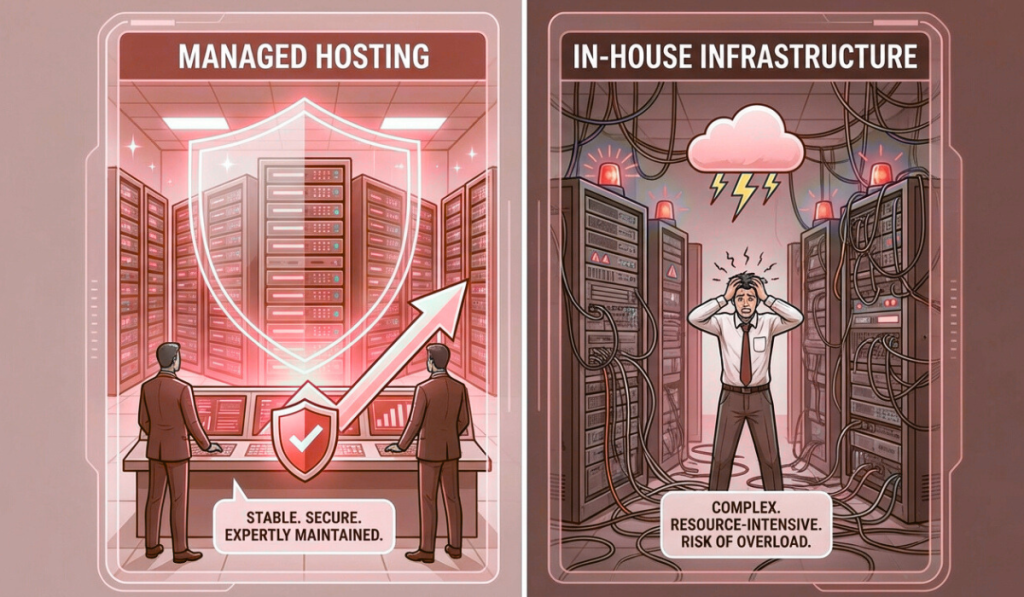
In the early days of a business, infrastructure decisions feel simple. You set up servers.Someone on the team manages them.Things mostly work. There is a sense of control.A feeling that “we’ve got this handled.” But then the business grows. Traffic increases.Customers depend on uptime.Systems become more complex.Downtime becomes expensive instead of inconvenient. And slowly, a question starts to surface — not in technical meetings, but in leadership discussions: Should we continue managing infrastructure in-house, or move to managed hosting? This question doesn’t come from weakness.It comes from maturity. Because at scale, infrastructure is no longer just about servers.It’s about risk, focus, cost, and resilience. This article explores managed hosting vs in-house infrastructure from a real business perspective — not theory, not vendor promises, but how these choices actually affect growing companies. What In-House Infrastructure Really Means In-house infrastructure sounds straightforward. You own or rent servers.Your team sets them up.Your team monitors them.Your team fixes issues. On paper, this feels empowering. You control everything.You customize everything.You depend on no one else. And for some businesses, especially in early stages, this approach works well. But as systems grow, in-house infrastructure becomes less about control and more about responsibility. The Hidden Scope of In-House Infrastructure Most businesses underestimate what “managing infrastructure” actually includes. It’s not just keeping servers running. It’s also: 24/7 monitoringIncident responseSecurity patchingBackup verificationCapacity planningHardware failuresPerformance tuningDisaster recovery planningDocumentationOn-call rotations In other words, in-house infrastructure is not a task. It’s a continuous operation. And operations don’t pause when your team is busy with product launches, customer meetings, or growth initiatives. Why Businesses Choose In-House Infrastructure Initially There are valid reasons many companies start with in-house infrastructure. Perceived Cost Savings At first glance, in-house hosting looks cheaper. No managed service fees.No external support costs.Just hardware and hosting expenses. But this view often ignores the cost of people, time, and risk. Control and Customization Some teams want full control. They want to tune everything.Experiment freely.Avoid external dependencies. For highly specialized workloads or very experienced teams, this can be beneficial. Early-Stage Simplicity In the beginning, systems are small. Traffic is manageable.Incidents are rare.One person can “keep an eye on things.” At this stage, in-house infrastructure often feels sufficient. The problem is not where businesses start. It’s where they stay too long. What Changes as the Business Grows Growth changes infrastructure dynamics quietly. More users mean more load.More data means heavier databases.More features mean more moving parts. Suddenly: Servers need tuning.Monitoring needs to be proactive.Security risks increase.Downtime becomes visible to customers. The same infrastructure that worked last year now feels fragile. This is where the cracks begin to show. The Real Cost of In-House Infrastructure In-house infrastructure costs are rarely transparent. They’re distributed across salaries, stress, and opportunity loss. People Cost Infrastructure doesn’t manage itself. Someone must: Respond to alerts at nightInvestigate slowdownsApply updatesFix outages That “someone” is often a senior engineer — the same person who could be building features or improving the product. Opportunity Cost Every hour spent firefighting infrastructure is an hour not spent on growth. Delayed releasesSlower innovationBurned-out teams These costs don’t show up on invoices, but they compound over time. Risk Cost In-house teams are rarely staffed for worst-case scenarios. What happens when: A key engineer leaves?Multiple failures occur at once?A security incident happens at night? Risk exposure increases silently. What Managed Hosting Actually Means Managed hosting is often misunderstood. It’s not “giving up control.”It’s not “outsourcing responsibility blindly.” Managed hosting means partnering with a team whose core job is infrastructure operations. They handle: MonitoringSecurityUpdatesBackupsIncident responseOptimization So your internal team doesn’t have to. This shift changes how businesses operate. Why Businesses Move to Managed Hosting Most businesses don’t move to managed hosting because they want less control. They move because they want less chaos. Stability Over Heroics In-house setups often rely on hero engineers. The person who fixes things at midnight.The person who knows the system inside out. Managed hosting replaces heroics with processes. Systems don’t depend on individuals.They depend on procedures. Predictable Operations With managed hosting: Issues are detected earlyIncidents are handled calmlyMaintenance is plannedCommunication is clear This predictability reduces stress across the organization. Focus on Core Business Perhaps the biggest benefit is focus. Product teams build.Sales teams sell.Leadership plans. Infrastructure stops being a daily concern. Managed Hosting vs In-House: A Practical Comparison Let’s compare both approaches where it actually matters. Reliability In-house:Depends heavily on team availability and experience. Managed hosting:Designed around uptime, redundancy, and proactive monitoring. If uptime affects revenue or reputation, managed hosting usually wins. Security In-house:Security is only as strong as the team’s time and expertise. Managed hosting:Security is continuous, structured, and monitored. Security failures rarely come from lack of tools — they come from lack of attention. Cost In-house:Appears cheaper initially, becomes expensive as complexity grows. Managed hosting:Higher visible cost, lower hidden cost. When people, risk, and downtime are factored in, managed hosting is often more economical. Scalability In-house:Scaling requires planning, hiring, and often stress. Managed hosting:Scaling is supported by experience and infrastructure readiness. Growth feels less disruptive. Team Health In-house:On-call stress, firefighting, burnout. Managed hosting:Calmer teams, fewer emergencies, better work-life balance. This matters more than most businesses admit. When In-House Infrastructure Still Makes Sense Managed hosting is not the right answer for everyone. In-house infrastructure can still make sense when: You have a large, experienced ops teamInfrastructure is your core competencyWorkloads are highly specializedYou require full internal control for regulatory reasons The key is honesty. If your team truly wants to run infrastructure — and is staffed to do it well — in-house can work. For most growing businesses, this is not the case. Why Many Businesses Switch Too Late The shift to managed hosting often happens after a crisis. A major outage.A security incident.A failed campaign. At that point, the decision is reactive. Emergency migrations are stressful.They increase risk.They consume leadership attention. The healthiest transitions happen before things break. The Middle Ground: Shared Responsibility Models Some businesses choose a hybrid approach. Managed hosting for core infrastructureIn-house control over application logicClear responsibility boundaries
Cloud Hosting vs Dedicated Servers — Which Is Better for Your Business?

Most businesses don’t think deeply about hosting at the beginning. You pick something that works.You launch.You move on. But then the business grows. Traffic increases.Customers depend on your platform.Revenue becomes tied to uptime. And suddenly, hosting is no longer a background decision. It becomes a strategic one. At some point, nearly every growing business asks the same question: Should we stay on cloud hosting, or move to dedicated servers? It sounds like a technical question.In reality, it’s a business question. Because the answer affects cost, performance, reliability, team workload, and how confidently you can grow. This article is written for founders, CTOs, and decision-makers who want clarity — not marketing slogans — on cloud hosting vs dedicated servers, and how to choose what’s right for their business. Why This Comparison Matters More Than Ever A decade ago, the answer felt obvious. Cloud hosting was “the future.”Dedicated servers felt “old-school.” But reality has matured. Cloud has evolved — and so have its limitations.Dedicated servers have improved — and regained relevance. Today, many businesses are re-evaluating earlier cloud decisions. Not because cloud failed — but because growth changed the requirements. The best choice is no longer universal.It’s contextual. What Cloud Hosting Really Offers Cloud hosting is built on abstraction. Instead of managing physical machines, you interact with virtual resources — compute, storage, networking — that can be provisioned on demand. This abstraction delivers some clear advantages. The Core Strengths of Cloud Hosting Cloud hosting shines when flexibility matters. You can launch quickly.Scale resources up or down.Experiment without long-term commitments. For businesses that face unpredictable demand, cloud hosting offers a sense of freedom. Cloud hosting works particularly well for: Early-stage startupsApplications with spiky trafficDevelopment and testing environmentsShort-term projectsGlobal or distributed user bases It removes friction in the early phases of growth. But abstraction comes with trade-offs. The Hidden Realities of Cloud Hosting Cloud hosting often feels simple — until it doesn’t. As systems grow, businesses start encountering issues that aren’t obvious at the beginning. Performance Variability Cloud resources are shared at the physical level. Even with strong isolation, performance can vary due to: Underlying hardware differencesNoisy neighborsVirtualization overhead For many workloads, this doesn’t matter.For others, it becomes a problem. Databases, real-time systems, and latency-sensitive applications often struggle with inconsistent performance. Cost Complexity Cloud pricing looks friendly at first. Pay only for what you use.Scale down when idle. But as usage grows: Bandwidth costs increaseStorage accumulatesMonitoring and backups add upScaling events spike bills Many businesses discover that cloud costs grow faster than revenue once traffic stabilizes. Cloud rewards unpredictability.It penalizes consistency. Operational Complexity Cloud reduces hardware management — but not operational responsibility. As systems grow, teams must manage: Scaling rulesSecurity configurationsNetwork designCost monitoringService dependencies Without strong discipline, cloud environments become complex and fragile. What Dedicated Servers Really Offer Dedicated servers take the opposite approach. Instead of abstraction, they offer ownership — or at least exclusive control — over physical resources. One server.One customer.No sharing. This simplicity delivers benefits that become more valuable as businesses mature. The Core Strengths of Dedicated Servers Dedicated servers excel at predictability. You know exactly what resources you have.You know how they behave.You know what they cost. This predictability is powerful. Dedicated servers are ideal for: High-traffic websitesDatabase-heavy applicationsRevenue-critical platformsCompliance-driven businessesLong-running, stable workloads When performance consistency matters more than instant elasticity, dedicated servers shine. Performance You Can Rely On Dedicated servers offer: Full CPU accessConsistent memory availabilityHigh-performance storageStable networking There are no noisy neighbors.No virtualization layers to interfere. Performance under load remains stable — which is critical for applications where slowdowns directly impact users or revenue. Cost Predictability Dedicated servers typically come with fixed monthly pricing. This allows businesses to: Plan budgets confidentlyForecast costs accuratelyAvoid billing surprises For sustained workloads, dedicated servers often cost less than equivalent cloud setups over time. Operational Simplicity Dedicated environments are easier to reason about. Fewer moving parts.Clear boundaries.Straightforward monitoring. This simplicity reduces operational stress — especially for teams without large DevOps departments. Where Dedicated Servers Can Fall Short Dedicated servers are not perfect. They come with trade-offs that businesses must understand. Scaling Requires Planning Dedicated servers don’t scale instantly. Adding capacity requires: Provisioning new hardwareMigrating workloadsPlanning ahead This isn’t a problem for predictable growth — but it can feel limiting for sudden spikes. Upfront Commitment Dedicated servers usually involve longer commitments. This can feel restrictive for early-stage businesses still experimenting with direction and scale. Cloud vs Dedicated: A Practical Comparison Let’s compare both options across the factors that matter most to businesses. Performance Cloud:Good, but variable under load. Dedicated:Consistent and predictable. If performance stability matters, dedicated servers usually win. Scalability Cloud:Instant elasticity. Dedicated:Planned scaling. If traffic is unpredictable, cloud has the edge.If traffic is stable, dedicated servers are sufficient and often better. Cost Cloud:Low entry cost, unpredictable long-term spend. Dedicated:Higher entry cost, predictable monthly pricing. For sustained workloads, dedicated servers often become more cost-effective over time. Security Cloud:Strong platform security, but shared responsibility. Dedicated:Physical isolation, full control. Both can be secure — but dedicated servers simplify isolation and compliance. Operational Overhead Cloud:Less hardware management, more configuration complexity. Dedicated:More responsibility, but simpler environments. Teams often find dedicated environments easier to manage at scale. Why Many Businesses End Up Choosing Hybrid As businesses mature, many realize the answer isn’t cloud or dedicated. It’s both. Hybrid architectures combine: Dedicated servers for core systemsCloud resources for bursts, experiments, and global reachCDNs for traffic distribution This approach delivers: Predictability where it mattersFlexibility where it helpsBetter cost controlReduced risk Hybrid setups are increasingly common for growing and enterprise-level businesses. Which Option Is Better for Your Business Stage? The “right” choice often depends on where you are. Early-Stage Businesses Cloud hosting is usually better. Fast setupLow commitmentRoom to experiment At this stage, flexibility matters more than optimization. Growing Businesses This is where the decision becomes nuanced. If traffic is stabilizing and costs are rising, dedicated servers deserve serious consideration. If growth is unpredictable, hybrid approaches work well. Mature Businesses Dedicated or hybrid setups often make the most sense. Predictable performanceStable
Cloud Hosting Services in Noida 2026 — A Practical Buyer’s Guide

A few years ago, cloud hosting was discussed almost exclusively inside engineering teams. Developers debated instance types.CTOs discussed scalability.IT teams talked about uptime. Business leaders barely noticed. But that has changed. Today, cloud hosting decisions are no longer buried in technical meetings. They appear in budget reviews, boardroom discussions, and growth planning sessions. And the reason is simple: When cloud hosting works, businesses scale quietly.When it doesn’t, everyone feels it. Customers notice slowness.Finance teams notice unpredictable bills.Operations teams feel pressure.Leadership starts asking hard questions. For businesses in Noida — a region that has rapidly evolved into a hub for SaaS companies, fintech platforms, digital agencies, and enterprise technology teams — cloud hosting is no longer optional. But choosing the right cloud hosting service has become far more complex than it used to be. This guide is written for 2026 buyers who want clarity. Not hype.Not jargon.Not one-size-fits-all advice. But a practical, grounded understanding of how to evaluate cloud hosting services in Noida based on real business needs. Why Noida Has Become a Cloud Hosting Hotspot Noida’s rise as a cloud and hosting hub didn’t happen overnight. Several forces converged: Rapid growth of tech startupsExpansion of enterprise IT operationsStrong connectivity and infrastructureProximity to Delhi NCR decision-makersGrowing demand for data-driven businesses As companies in Noida grew more digital, they faced similar challenges: Traffic spikes during campaignsNeed for fast deploymentsRemote teams accessing systemsIntegration-heavy applicationsAlways-on customer platforms Cloud hosting promised answers to these problems. And for many businesses, it delivered — at least initially. But as workloads matured, the questions became more nuanced. What Cloud Hosting Really Means in 2026 Cloud hosting is often described as “flexible,” “scalable,” and “on-demand.” All of that is true. But by 2026, cloud hosting has also become: ComplexFragmentedCost-sensitiveDeeply tied to architecture decisions At its core, cloud hosting means running applications on virtualized infrastructure that can scale resources dynamically. What has changed is how businesses use it. In 2026, cloud hosting is rarely used in isolation. It’s part of a broader infrastructure strategy that may include: Dedicated serversHybrid environmentsEdge locationsAutomation platformsManaged services Understanding this context is critical for buyers. Why Businesses Choose Cloud Hosting (And Why Some Regret It) Let’s start with the positives. Businesses in Noida choose cloud hosting because it offers: Fast provisioningElastic scalingGlobal reachHigh availability optionsModern tooling For startups and fast-growing teams, this flexibility can be transformational. But cloud hosting also introduces challenges that many buyers underestimate: Unpredictable costsPerformance variabilityComplex networkingVendor lock-inOperational overhead A practical buyer in 2026 must understand both sides before committing. Key Cloud Hosting Use Cases in Noida Not all workloads benefit equally from cloud hosting. In Noida, cloud hosting is commonly used for: Customer-facing SaaS applicationsMarketing websites with variable trafficMobile app backendsAnalytics and reporting platformsDev and staging environmentsAutomation workflows But some workloads struggle in pure cloud environments, especially at scale. High-transaction databasesLatency-sensitive applicationsPredictable long-term workloadsCost-sensitive systems Understanding where cloud fits — and where it doesn’t — is essential. 1. Performance: The Cloud Is Fast, Until It Isn’t Cloud platforms advertise impressive performance numbers. But enterprises and growing businesses know that real-world performance is more nuanced. Cloud performance depends on: Instance type selectionUnderlying hardwareShared resource contentionNetwork routingStorage configuration In 2026, buyers should look beyond raw specs and ask: Is performance predictable?How does performance behave under load?Are there noisy-neighbor risks?How is storage I/O handled? For applications with steady, predictable demand, inconsistent performance can be worse than slightly lower but stable performance. 2. Scalability: Elasticity With a Price Tag Elastic scaling is one of cloud hosting’s biggest selling points. Scale up when traffic spikes.Scale down when it drops. In practice, this introduces trade-offs. Scaling too slowly leads to outages.Scaling too aggressively leads to cost spikes. By 2026, mature buyers evaluate scalability with discipline: Do we actually need instant elasticity?Can we predict growth patterns?Would planned scaling be more cost-effective? Many businesses in Noida are moving toward controlled scalability, combining cloud elasticity with capacity planning. 3. Cost: From Affordable to Alarming Cloud hosting often starts cheap. Then usage grows.Then data transfers increase.Then storage accumulates.Then bills become confusing. In 2026, cost transparency is one of the biggest buyer concerns. Buyers should ask: How predictable are monthly costs?What triggers cost spikes?How are bandwidth and storage priced?What happens when we scale? A practical buyer looks beyond the first invoice and models costs over 12, 24, and 36 months. 4. Reliability: Architecture Matters More Than Provider Names Cloud providers advertise high availability, but reliability is ultimately determined by how systems are designed. Single-region deployments fail.Poorly configured load balancers fail.Unmonitored services fail. In Noida, businesses should evaluate: Multi-zone supportBackup strategiesDisaster recovery planningMonitoring and alertingFailover readiness Cloud hosting is reliable when architecture supports it. Without that, it’s just expensive hosting. 5. Security: Shared Responsibility Is Often Misunderstood One of the most misunderstood aspects of cloud hosting is security responsibility. Cloud providers secure the platform.You secure what you build on it. In 2026, buyers must understand: Access control modelsNetwork segmentationEncryption standardsAudit loggingCredential management Cloud hosting is secure — but only when configured correctly. Misconfiguration remains the leading cause of cloud security incidents. 6. Compliance and Data Residency Many Noida-based businesses operate globally while serving Indian customers. This introduces compliance considerations: Data residencyAudit requirementsIndustry regulations Buyers should ensure cloud providers support: Regional data centersCompliance documentationCustom retention policies Ignoring compliance early often leads to costly re-architecture later. 7. Managed Cloud vs Self-Managed Cloud In 2026, cloud hosting buyers face a crucial choice: Do we manage everything ourselves?Or do we choose managed cloud services? Self-managed cloud offers control but requires strong internal expertise. Managed cloud services reduce operational burden but may limit customization. Enterprises and growing businesses should evaluate: Internal team capacity24/7 support needsRisk toleranceCost vs effort trade-offs For many, a managed or semi-managed approach provides better long-term stability. 8. Vendor Lock-In: The Quiet Risk As businesses grow deeper into cloud ecosystems, moving becomes harder. Proprietary servicesCustom APIsDeep integrations In 2026, smart buyers assess portability early. They ask: Can we migrate if needed?Are we using open standards?Is our architecture flexible? Freedom to move is a form