
Managed Hosting vs In-House Infrastructure – Which Is Better for Growing Businesses?
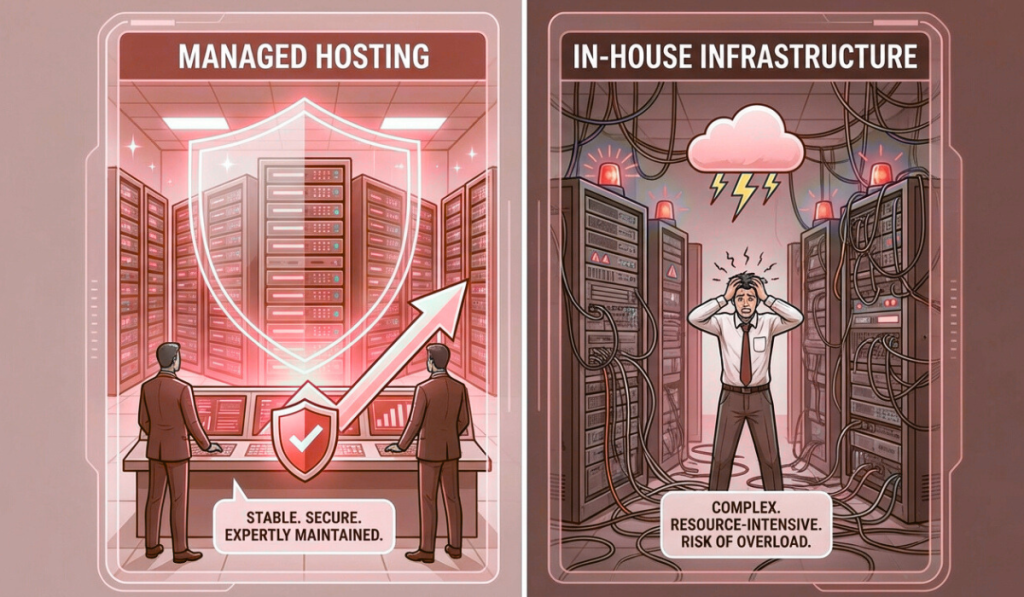
In the early days of a business, infrastructure decisions feel simple. You set up servers.Someone on the team manages them.Things mostly work. There is a sense of control.A feeling that “we’ve got this handled.” But then the business grows. Traffic increases.Customers depend on uptime.Systems become more complex.Downtime becomes expensive instead of inconvenient. And slowly, a question starts to surface — not in technical meetings, but in leadership discussions: Should we continue managing infrastructure in-house, or move to managed hosting? This question doesn’t come from weakness.It comes from maturity. Because at scale, infrastructure is no longer just about servers.It’s about risk, focus, cost, and resilience. This article explores managed hosting vs in-house infrastructure from a real business perspective — not theory, not vendor promises, but how these choices actually affect growing companies. What In-House Infrastructure Really Means In-house infrastructure sounds straightforward. You own or rent servers.Your team sets them up.Your team monitors them.Your team fixes issues. On paper, this feels empowering. You control everything.You customize everything.You depend on no one else. And for some businesses, especially in early stages, this approach works well. But as systems grow, in-house infrastructure becomes less about control and more about responsibility. The Hidden Scope of In-House Infrastructure Most businesses underestimate what “managing infrastructure” actually includes. It’s not just keeping servers running. It’s also: 24/7 monitoringIncident responseSecurity patchingBackup verificationCapacity planningHardware failuresPerformance tuningDisaster recovery planningDocumentationOn-call rotations In other words, in-house infrastructure is not a task. It’s a continuous operation. And operations don’t pause when your team is busy with product launches, customer meetings, or growth initiatives. Why Businesses Choose In-House Infrastructure Initially There are valid reasons many companies start with in-house infrastructure. Perceived Cost Savings At first glance, in-house hosting looks cheaper. No managed service fees.No external support costs.Just hardware and hosting expenses. But this view often ignores the cost of people, time, and risk. Control and Customization Some teams want full control. They want to tune everything.Experiment freely.Avoid external dependencies. For highly specialized workloads or very experienced teams, this can be beneficial. Early-Stage Simplicity In the beginning, systems are small. Traffic is manageable.Incidents are rare.One person can “keep an eye on things.” At this stage, in-house infrastructure often feels sufficient. The problem is not where businesses start. It’s where they stay too long. What Changes as the Business Grows Growth changes infrastructure dynamics quietly. More users mean more load.More data means heavier databases.More features mean more moving parts. Suddenly: Servers need tuning.Monitoring needs to be proactive.Security risks increase.Downtime becomes visible to customers. The same infrastructure that worked last year now feels fragile. This is where the cracks begin to show. The Real Cost of In-House Infrastructure In-house infrastructure costs are rarely transparent. They’re distributed across salaries, stress, and opportunity loss. People Cost Infrastructure doesn’t manage itself. Someone must: Respond to alerts at nightInvestigate slowdownsApply updatesFix outages That “someone” is often a senior engineer — the same person who could be building features or improving the product. Opportunity Cost Every hour spent firefighting infrastructure is an hour not spent on growth. Delayed releasesSlower innovationBurned-out teams These costs don’t show up on invoices, but they compound over time. Risk Cost In-house teams are rarely staffed for worst-case scenarios. What happens when: A key engineer leaves?Multiple failures occur at once?A security incident happens at night? Risk exposure increases silently. What Managed Hosting Actually Means Managed hosting is often misunderstood. It’s not “giving up control.”It’s not “outsourcing responsibility blindly.” Managed hosting means partnering with a team whose core job is infrastructure operations. They handle: MonitoringSecurityUpdatesBackupsIncident responseOptimization So your internal team doesn’t have to. This shift changes how businesses operate. Why Businesses Move to Managed Hosting Most businesses don’t move to managed hosting because they want less control. They move because they want less chaos. Stability Over Heroics In-house setups often rely on hero engineers. The person who fixes things at midnight.The person who knows the system inside out. Managed hosting replaces heroics with processes. Systems don’t depend on individuals.They depend on procedures. Predictable Operations With managed hosting: Issues are detected earlyIncidents are handled calmlyMaintenance is plannedCommunication is clear This predictability reduces stress across the organization. Focus on Core Business Perhaps the biggest benefit is focus. Product teams build.Sales teams sell.Leadership plans. Infrastructure stops being a daily concern. Managed Hosting vs In-House: A Practical Comparison Let’s compare both approaches where it actually matters. Reliability In-house:Depends heavily on team availability and experience. Managed hosting:Designed around uptime, redundancy, and proactive monitoring. If uptime affects revenue or reputation, managed hosting usually wins. Security In-house:Security is only as strong as the team’s time and expertise. Managed hosting:Security is continuous, structured, and monitored. Security failures rarely come from lack of tools — they come from lack of attention. Cost In-house:Appears cheaper initially, becomes expensive as complexity grows. Managed hosting:Higher visible cost, lower hidden cost. When people, risk, and downtime are factored in, managed hosting is often more economical. Scalability In-house:Scaling requires planning, hiring, and often stress. Managed hosting:Scaling is supported by experience and infrastructure readiness. Growth feels less disruptive. Team Health In-house:On-call stress, firefighting, burnout. Managed hosting:Calmer teams, fewer emergencies, better work-life balance. This matters more than most businesses admit. When In-House Infrastructure Still Makes Sense Managed hosting is not the right answer for everyone. In-house infrastructure can still make sense when: You have a large, experienced ops teamInfrastructure is your core competencyWorkloads are highly specializedYou require full internal control for regulatory reasons The key is honesty. If your team truly wants to run infrastructure — and is staffed to do it well — in-house can work. For most growing businesses, this is not the case. Why Many Businesses Switch Too Late The shift to managed hosting often happens after a crisis. A major outage.A security incident.A failed campaign. At that point, the decision is reactive. Emergency migrations are stressful.They increase risk.They consume leadership attention. The healthiest transitions happen before things break. The Middle Ground: Shared Responsibility Models Some businesses choose a hybrid approach. Managed hosting for core infrastructureIn-house control over application logicClear responsibility boundaries
Cloud Hosting vs Dedicated Servers — Which Is Better for Your Business?

Most businesses don’t think deeply about hosting at the beginning. You pick something that works.You launch.You move on. But then the business grows. Traffic increases.Customers depend on your platform.Revenue becomes tied to uptime. And suddenly, hosting is no longer a background decision. It becomes a strategic one. At some point, nearly every growing business asks the same question: Should we stay on cloud hosting, or move to dedicated servers? It sounds like a technical question.In reality, it’s a business question. Because the answer affects cost, performance, reliability, team workload, and how confidently you can grow. This article is written for founders, CTOs, and decision-makers who want clarity — not marketing slogans — on cloud hosting vs dedicated servers, and how to choose what’s right for their business. Why This Comparison Matters More Than Ever A decade ago, the answer felt obvious. Cloud hosting was “the future.”Dedicated servers felt “old-school.” But reality has matured. Cloud has evolved — and so have its limitations.Dedicated servers have improved — and regained relevance. Today, many businesses are re-evaluating earlier cloud decisions. Not because cloud failed — but because growth changed the requirements. The best choice is no longer universal.It’s contextual. What Cloud Hosting Really Offers Cloud hosting is built on abstraction. Instead of managing physical machines, you interact with virtual resources — compute, storage, networking — that can be provisioned on demand. This abstraction delivers some clear advantages. The Core Strengths of Cloud Hosting Cloud hosting shines when flexibility matters. You can launch quickly.Scale resources up or down.Experiment without long-term commitments. For businesses that face unpredictable demand, cloud hosting offers a sense of freedom. Cloud hosting works particularly well for: Early-stage startupsApplications with spiky trafficDevelopment and testing environmentsShort-term projectsGlobal or distributed user bases It removes friction in the early phases of growth. But abstraction comes with trade-offs. The Hidden Realities of Cloud Hosting Cloud hosting often feels simple — until it doesn’t. As systems grow, businesses start encountering issues that aren’t obvious at the beginning. Performance Variability Cloud resources are shared at the physical level. Even with strong isolation, performance can vary due to: Underlying hardware differencesNoisy neighborsVirtualization overhead For many workloads, this doesn’t matter.For others, it becomes a problem. Databases, real-time systems, and latency-sensitive applications often struggle with inconsistent performance. Cost Complexity Cloud pricing looks friendly at first. Pay only for what you use.Scale down when idle. But as usage grows: Bandwidth costs increaseStorage accumulatesMonitoring and backups add upScaling events spike bills Many businesses discover that cloud costs grow faster than revenue once traffic stabilizes. Cloud rewards unpredictability.It penalizes consistency. Operational Complexity Cloud reduces hardware management — but not operational responsibility. As systems grow, teams must manage: Scaling rulesSecurity configurationsNetwork designCost monitoringService dependencies Without strong discipline, cloud environments become complex and fragile. What Dedicated Servers Really Offer Dedicated servers take the opposite approach. Instead of abstraction, they offer ownership — or at least exclusive control — over physical resources. One server.One customer.No sharing. This simplicity delivers benefits that become more valuable as businesses mature. The Core Strengths of Dedicated Servers Dedicated servers excel at predictability. You know exactly what resources you have.You know how they behave.You know what they cost. This predictability is powerful. Dedicated servers are ideal for: High-traffic websitesDatabase-heavy applicationsRevenue-critical platformsCompliance-driven businessesLong-running, stable workloads When performance consistency matters more than instant elasticity, dedicated servers shine. Performance You Can Rely On Dedicated servers offer: Full CPU accessConsistent memory availabilityHigh-performance storageStable networking There are no noisy neighbors.No virtualization layers to interfere. Performance under load remains stable — which is critical for applications where slowdowns directly impact users or revenue. Cost Predictability Dedicated servers typically come with fixed monthly pricing. This allows businesses to: Plan budgets confidentlyForecast costs accuratelyAvoid billing surprises For sustained workloads, dedicated servers often cost less than equivalent cloud setups over time. Operational Simplicity Dedicated environments are easier to reason about. Fewer moving parts.Clear boundaries.Straightforward monitoring. This simplicity reduces operational stress — especially for teams without large DevOps departments. Where Dedicated Servers Can Fall Short Dedicated servers are not perfect. They come with trade-offs that businesses must understand. Scaling Requires Planning Dedicated servers don’t scale instantly. Adding capacity requires: Provisioning new hardwareMigrating workloadsPlanning ahead This isn’t a problem for predictable growth — but it can feel limiting for sudden spikes. Upfront Commitment Dedicated servers usually involve longer commitments. This can feel restrictive for early-stage businesses still experimenting with direction and scale. Cloud vs Dedicated: A Practical Comparison Let’s compare both options across the factors that matter most to businesses. Performance Cloud:Good, but variable under load. Dedicated:Consistent and predictable. If performance stability matters, dedicated servers usually win. Scalability Cloud:Instant elasticity. Dedicated:Planned scaling. If traffic is unpredictable, cloud has the edge.If traffic is stable, dedicated servers are sufficient and often better. Cost Cloud:Low entry cost, unpredictable long-term spend. Dedicated:Higher entry cost, predictable monthly pricing. For sustained workloads, dedicated servers often become more cost-effective over time. Security Cloud:Strong platform security, but shared responsibility. Dedicated:Physical isolation, full control. Both can be secure — but dedicated servers simplify isolation and compliance. Operational Overhead Cloud:Less hardware management, more configuration complexity. Dedicated:More responsibility, but simpler environments. Teams often find dedicated environments easier to manage at scale. Why Many Businesses End Up Choosing Hybrid As businesses mature, many realize the answer isn’t cloud or dedicated. It’s both. Hybrid architectures combine: Dedicated servers for core systemsCloud resources for bursts, experiments, and global reachCDNs for traffic distribution This approach delivers: Predictability where it mattersFlexibility where it helpsBetter cost controlReduced risk Hybrid setups are increasingly common for growing and enterprise-level businesses. Which Option Is Better for Your Business Stage? The “right” choice often depends on where you are. Early-Stage Businesses Cloud hosting is usually better. Fast setupLow commitmentRoom to experiment At this stage, flexibility matters more than optimization. Growing Businesses This is where the decision becomes nuanced. If traffic is stabilizing and costs are rising, dedicated servers deserve serious consideration. If growth is unpredictable, hybrid approaches work well. Mature Businesses Dedicated or hybrid setups often make the most sense. Predictable performanceStable
Cloud Hosting Services in Noida 2026 — A Practical Buyer’s Guide

A few years ago, cloud hosting was discussed almost exclusively inside engineering teams. Developers debated instance types.CTOs discussed scalability.IT teams talked about uptime. Business leaders barely noticed. But that has changed. Today, cloud hosting decisions are no longer buried in technical meetings. They appear in budget reviews, boardroom discussions, and growth planning sessions. And the reason is simple: When cloud hosting works, businesses scale quietly.When it doesn’t, everyone feels it. Customers notice slowness.Finance teams notice unpredictable bills.Operations teams feel pressure.Leadership starts asking hard questions. For businesses in Noida — a region that has rapidly evolved into a hub for SaaS companies, fintech platforms, digital agencies, and enterprise technology teams — cloud hosting is no longer optional. But choosing the right cloud hosting service has become far more complex than it used to be. This guide is written for 2026 buyers who want clarity. Not hype.Not jargon.Not one-size-fits-all advice. But a practical, grounded understanding of how to evaluate cloud hosting services in Noida based on real business needs. Why Noida Has Become a Cloud Hosting Hotspot Noida’s rise as a cloud and hosting hub didn’t happen overnight. Several forces converged: Rapid growth of tech startupsExpansion of enterprise IT operationsStrong connectivity and infrastructureProximity to Delhi NCR decision-makersGrowing demand for data-driven businesses As companies in Noida grew more digital, they faced similar challenges: Traffic spikes during campaignsNeed for fast deploymentsRemote teams accessing systemsIntegration-heavy applicationsAlways-on customer platforms Cloud hosting promised answers to these problems. And for many businesses, it delivered — at least initially. But as workloads matured, the questions became more nuanced. What Cloud Hosting Really Means in 2026 Cloud hosting is often described as “flexible,” “scalable,” and “on-demand.” All of that is true. But by 2026, cloud hosting has also become: ComplexFragmentedCost-sensitiveDeeply tied to architecture decisions At its core, cloud hosting means running applications on virtualized infrastructure that can scale resources dynamically. What has changed is how businesses use it. In 2026, cloud hosting is rarely used in isolation. It’s part of a broader infrastructure strategy that may include: Dedicated serversHybrid environmentsEdge locationsAutomation platformsManaged services Understanding this context is critical for buyers. Why Businesses Choose Cloud Hosting (And Why Some Regret It) Let’s start with the positives. Businesses in Noida choose cloud hosting because it offers: Fast provisioningElastic scalingGlobal reachHigh availability optionsModern tooling For startups and fast-growing teams, this flexibility can be transformational. But cloud hosting also introduces challenges that many buyers underestimate: Unpredictable costsPerformance variabilityComplex networkingVendor lock-inOperational overhead A practical buyer in 2026 must understand both sides before committing. Key Cloud Hosting Use Cases in Noida Not all workloads benefit equally from cloud hosting. In Noida, cloud hosting is commonly used for: Customer-facing SaaS applicationsMarketing websites with variable trafficMobile app backendsAnalytics and reporting platformsDev and staging environmentsAutomation workflows But some workloads struggle in pure cloud environments, especially at scale. High-transaction databasesLatency-sensitive applicationsPredictable long-term workloadsCost-sensitive systems Understanding where cloud fits — and where it doesn’t — is essential. 1. Performance: The Cloud Is Fast, Until It Isn’t Cloud platforms advertise impressive performance numbers. But enterprises and growing businesses know that real-world performance is more nuanced. Cloud performance depends on: Instance type selectionUnderlying hardwareShared resource contentionNetwork routingStorage configuration In 2026, buyers should look beyond raw specs and ask: Is performance predictable?How does performance behave under load?Are there noisy-neighbor risks?How is storage I/O handled? For applications with steady, predictable demand, inconsistent performance can be worse than slightly lower but stable performance. 2. Scalability: Elasticity With a Price Tag Elastic scaling is one of cloud hosting’s biggest selling points. Scale up when traffic spikes.Scale down when it drops. In practice, this introduces trade-offs. Scaling too slowly leads to outages.Scaling too aggressively leads to cost spikes. By 2026, mature buyers evaluate scalability with discipline: Do we actually need instant elasticity?Can we predict growth patterns?Would planned scaling be more cost-effective? Many businesses in Noida are moving toward controlled scalability, combining cloud elasticity with capacity planning. 3. Cost: From Affordable to Alarming Cloud hosting often starts cheap. Then usage grows.Then data transfers increase.Then storage accumulates.Then bills become confusing. In 2026, cost transparency is one of the biggest buyer concerns. Buyers should ask: How predictable are monthly costs?What triggers cost spikes?How are bandwidth and storage priced?What happens when we scale? A practical buyer looks beyond the first invoice and models costs over 12, 24, and 36 months. 4. Reliability: Architecture Matters More Than Provider Names Cloud providers advertise high availability, but reliability is ultimately determined by how systems are designed. Single-region deployments fail.Poorly configured load balancers fail.Unmonitored services fail. In Noida, businesses should evaluate: Multi-zone supportBackup strategiesDisaster recovery planningMonitoring and alertingFailover readiness Cloud hosting is reliable when architecture supports it. Without that, it’s just expensive hosting. 5. Security: Shared Responsibility Is Often Misunderstood One of the most misunderstood aspects of cloud hosting is security responsibility. Cloud providers secure the platform.You secure what you build on it. In 2026, buyers must understand: Access control modelsNetwork segmentationEncryption standardsAudit loggingCredential management Cloud hosting is secure — but only when configured correctly. Misconfiguration remains the leading cause of cloud security incidents. 6. Compliance and Data Residency Many Noida-based businesses operate globally while serving Indian customers. This introduces compliance considerations: Data residencyAudit requirementsIndustry regulations Buyers should ensure cloud providers support: Regional data centersCompliance documentationCustom retention policies Ignoring compliance early often leads to costly re-architecture later. 7. Managed Cloud vs Self-Managed Cloud In 2026, cloud hosting buyers face a crucial choice: Do we manage everything ourselves?Or do we choose managed cloud services? Self-managed cloud offers control but requires strong internal expertise. Managed cloud services reduce operational burden but may limit customization. Enterprises and growing businesses should evaluate: Internal team capacity24/7 support needsRisk toleranceCost vs effort trade-offs For many, a managed or semi-managed approach provides better long-term stability. 8. Vendor Lock-In: The Quiet Risk As businesses grow deeper into cloud ecosystems, moving becomes harder. Proprietary servicesCustom APIsDeep integrations In 2026, smart buyers assess portability early. They ask: Can we migrate if needed?Are we using open standards?Is our architecture flexible? Freedom to move is a form
Dedicated Server Hosting in Noida — What Enterprises Should Truly Look For

There’s a moment many enterprises remember clearly. Not when they launched.Not when they hired their first engineer.But the day performance issues stopped being a technical problem and became a business conversation. It often starts quietly. A report takes longer to load.An internal dashboard lags during peak hours.Customers complain that “the app feels slow.”Support tickets begin to pile up. At first, teams assume it’s temporary. A traffic spike. A bad deploy. A configuration issue. But then it keeps happening. And eventually, someone in leadership asks a question that changes everything: “Is our infrastructure still good enough for where we are now?” For many enterprises in Noida — from SaaS companies and fintech firms to manufacturing platforms and digital agencies — that question leads to one conclusion: Shared and over-abstracted infrastructure is no longer enough. This is where dedicated server hosting enters the conversation. Not as a luxury. Not as an upgrade for vanity. But as a foundation for stability, control, and long-term growth. This article is written for enterprises evaluating dedicated server hosting in Noida and trying to understand what actually matters — beyond marketing promises and spec sheets. Why Enterprises in Noida Are Reconsidering Their Hosting Strategy Noida has evolved rapidly. What was once primarily an outsourcing and IT services hub is now home to: SaaS product companiesFintech platformsEdTech and HealthTech firmsData-driven enterprisesAgencies managing global clients These businesses share a few common realities: They handle growing traffic.They run complex applications.They store sensitive data.They depend on uptime for revenue and reputation. As a result, infrastructure decisions are no longer driven by cost alone. They’re driven by risk, predictability, and control. Dedicated server hosting offers something enterprises increasingly value: Ownership over performance. But not all dedicated servers are created equal. And not every provider understands enterprise needs. What Dedicated Server Hosting Actually Means (And What It Doesn’t) At its simplest, a dedicated server means one thing: A physical server allocated to a single customer. No noisy neighbors.No shared CPU cycles.No unpredictable resource contention. But for enterprises, dedicated hosting is not just about isolation. It’s about what that isolation enables. Predictable performanceCustom architectureStronger security postureBetter compliance alignmentFine-grained monitoringLong-term scalability What it does not automatically guarantee is: High availabilityGood supportProper monitoringStrong security practicesBusiness continuity Those depend on the provider. That’s why enterprises must look beyond the word “dedicated” and evaluate the environment around it. Performance Consistency: The Real Reason Enterprises Choose Dedicated Servers Enterprises don’t just need performance. They need consistent performance. A system that performs well 90% of the time but struggles during peak hours is a liability. Dedicated servers allow enterprises to: Reserve CPU resourcesAllocate memory without contentionUse high-performance storageControl network throughput But enterprises in Noida should go deeper than just CPU cores and RAM numbers. They should ask: What kind of processors are used?How is disk I/O handled?Is NVMe available for database workloads?What network bandwidth is guaranteed, not just advertised? Performance consistency matters most for: DatabasesPayment systemsReal-time dashboardsAPIsHigh-traffic applications A dedicated server should behave the same at 3 AM and 3 PM. Anything less introduces uncertainty into business operations. Network Quality and Latency: Often Ignored, Always Felt One of the most overlooked aspects of dedicated server hosting is network quality. Enterprises often focus on compute and storage, but network issues quietly degrade user experience. Latency affects: API response timesPage load speedReal-time data syncInternal toolsRemote team productivity When choosing dedicated server hosting in Noida, enterprises should evaluate: Data center connectivityPeering arrangementsRedundant network pathsPacket loss handlingBandwidth guarantees A server with excellent hardware but poor networking will still feel slow. For enterprises serving Indian users, regional latency matters. For those serving global customers, international routing quality becomes critical. Storage Architecture: Where Most Bottlenecks Begin Storage is where many enterprise systems struggle first. As data grows, poorly designed storage setups become bottlenecks that affect the entire application. Enterprises should look beyond raw storage size and ask: What type of storage is used?How is redundancy handled?What are the IOPS limits?How are backups performed? NVMe-based storage dramatically improves performance for: DatabasesAnalytics platformsHigh-transaction systemsSearch and indexing engines RAID configuration also matters. The wrong setup can either waste performance or reduce fault tolerance. A dedicated server for enterprise use should treat storage as a performance component, not just a place to keep data. Reliability Is an Architecture Choice, Not a Promise Many providers advertise uptime percentages. But enterprises know better. Reliability is not achieved by contracts. It’s achieved by design. When evaluating dedicated server hosting in Noida, enterprises should assess: Power redundancyNetwork redundancyHardware monitoringProactive maintenanceReplacement policies Questions enterprises should ask include: What happens if a disk fails?How quickly is hardware replaced?Is monitoring proactive or reactive?Are failures detected before users notice? Reliable hosting environments are boring. They don’t make headlines. They don’t generate urgent tickets. They just work. And that’s exactly what enterprises need. Security at the Infrastructure Level Security incidents don’t start at the application layer. They often start at the infrastructure level. Enterprises dealing with customer data, financial records, or intellectual property must ensure that their hosting environment supports strong security practices. Dedicated server hosting allows for: Isolated environmentsCustom firewall rulesRestricted accessNetwork segmentation But enterprises should look for more than just isolation. They should ask: How is server access managed?Are credentials rotated?Is there logging and auditability?How are vulnerabilities patched? Security is not a feature you bolt on later. It’s something your hosting environment must support by design. Compliance and Data Governance Many enterprises in Noida operate under regulatory requirements. Financial services.Healthcare.Education.Global SaaS platforms. These businesses must consider: Data residencyAudit requirementsAccess controlsBackup retention policies Dedicated servers offer more flexibility to meet compliance needs, but only if the provider understands enterprise governance. Enterprises should ensure their hosting partner can support compliance conversations — not avoid them. Scalability Without Chaos A common misconception is that dedicated servers don’t scale. In reality, they scale differently. Instead of automatic elasticity, enterprises gain intentional scalability. Planned upgradesHorizontal expansionHybrid architecturesCapacity forecasting Dedicated server hosting works best when combined with: Proper monitoringGrowth planningClear upgrade paths Enterprises should evaluate whether the provider can support growth without
10 Best Web Hosting Companies in Noida – A Practical Guide for Businesses That Want to Grow
Meet Riya. She runs a small but fast-growing D2C brand from an office in Noida. Her website is the storefront, the payment gateway, and the primary marketing channel. But last month, a flash sale crashed her site for two hours — orders were lost, customers pinged support, and her team scrambled. Riya needs hosting that just works — fast, secure, and backed by local support she can call at 10 pm if something breaks. If you’re like Riya, this guide is written for you. It’s a story-driven, practical walkthrough of the 10 best web hosting companies in Noida, starting with a local, enterprise-capable option and covering nine others that serve businesses in and around Noida. For each provider you’ll get a clear problem → solution narrative, what they’re best at, real buying advice, and a checklist you can use to choose the right host for your business. Note: the first place in our list is Purvaco — chosen because many Noida businesses prefer a local partner with cloud, VPS, and managed hosting options. How to use this guide Read the opening case (Riya) — it follows practical decisions you’ll face. For each company section, note the problems they solve and the buyer persona they best fit. Use the final checklist and the comparison table to make a short list. Contact the shortlisted hosts — ask for an SLA, trial, test credentials, and references. Quick comparison (at a glance) Rank Provider Best for Local presence 1 Purvaco Local enterprise-grade cloud & managed hosting Noida / Greater Noida 2 Zebyte Cloud Affordable local cloud & shared hosting Noida 3 eWebGuru Budget-friendly shared & dedicated hosting Noida 4 XS Infosol Small business hosting + software tools Noida 5 InfoSky Solutions Reseller hosting & local support Noida 6 Go4hosting Enterprise colocation, DR, and cloud Noida DC presence 7 Cyfuture Regional cloud & specialized DR Noida 8 Candid Host Local small-business hosting & domain services Noida 9 ServerBasket Hardware & server leasing, managed hosting Noida 10 KKRF Technology Web + managed IT for agencies Noida (All providers above have operations or clear service availability in and around Noida.) Riya’s problem (the set-up) Riya runs a D2C brand selling handcrafted homeware. Traffic spikes come from weekend social campaigns and occasional influencer pushes. Her site is WordPress + WooCommerce on a basic shared host. The pain points: Slow page loads as product images accumulate Cart timeouts during spikes One-hour support ticket response time (no evenings) No reliable backups or staging site Her goals: Fast page loads for Indian customers (low latency to Noida). 99.9%+ uptime, especially during sales. A hosting partner who understands PCI/checkout security. Transparent pricing and the option to grow (VPS → cloud → dedicated). Let’s walk Riya — and you — through 10 real hosting providers that solve these problems. Each section reads like a short story: the problem, why this provider helps, what to ask them, and the real-world tradeoffs. 1 — Purvaco (Best place to start — local, managed, scalable) Riya’s choice moment Riya wants a partner — not just a server. She needs someone who can handle migrations, optimize performance, and pick up the phone when checkout fails. Purvaco is the local, full-stack option she finds: cloud hosting, managed VPS, dedicated servers, and migration support — all with offices near Noida. Why Purvaco fits the brief Local data routes and Indian PoP choices reduce latency for customers in NCR. Managed WordPress/WooCommerce stacks, including caching and image optimization. Migration support: the team moves sites with zero-downtime strategies (staging → sync → cutover). Security: PCI-compatible hosting options, web application firewalls, and DDoS mitigation. Transparent SLAs and locally accessible support (telephone & chat, including evenings). What Riya gets A pre-migration audit that identifies heavy queries and image bloat. Staging environment for testing flash-sale traffic. Cache layers (Varnish / Redis) and CDN integration to serve images faster. Managed backups and rollback points. Questions Riya should ask Purvaco What is your SLA for uptime and how are credits calculated? Do you provide staging-to-production sync and automated rollback? Is PCI DSS compliance supported for checkout? What are the response SLAs for critical incidents (phone, chat, ticket)? Tradeoffs Managed service fees are higher than DIY shared hosting — but the time saved and reduced downtime usually pays for itself in conversion uplift. Also See: Purvaco Dedicated Server Hosting Plans 2 — Zebyte Cloud (Affordable local cloud for growing startups) The problem Zebyte solves A co-founder named Aman wants to move his SaaS MVP off shared hosting to avoid noisy-neighbor issues, but capital is limited. He needs simple, low-cost cloud instances and responsive support within the same time zone. Why Zebyte helps Noida-based operations mean local billing and support convenience. Entry-friendly cloud VPS plans, fast NVMe options, and straightforward cPanel/SSH access. Pay-as-you-grow billing for small teams. What to expect Simple control panel and one-click app installs. Backup options and security add-ons. Good value for early-stage startups moving from shared hosting. Questions to ask Zebyte Are snapshots and daily backups included or addon? What CPU/RAM throttling policies exist? Can you demonstrate baseline performance for WordPress/WooCommerce? Tradeoffs Zebyte is cost-friendly but might not have enterprise-grade SLAs or the extended managed services of larger providers. It’s ideal for startups scaling past shared hosting. 3 — eWebGuru (Budget hosting with long local history) The scenario Sanjay runs a niche blog with predictable traffic and wants a low-cost, reliable host with Indian support. He’s price-sensitive but values local contact. Why eWebGuru works Established Noida presence with long-running shared & VPS products. Good for informational sites or early-stage stores that aren’t handling heavy transactional loads. Offers direct cPanel access, affordable dedicated server rentals, and local phone support. Key features Cost-effective shared hosting with cPanel. Dedicated server options at competitive on-paper prices. Localised billing and support. Questions to ask eWebGuru Are backups included? How quickly can you restore a backup? What’s the upgrade path from shared → VPS → dedicated? Do you include SSL and basic security scanning? Tradeoffs eWebGuru is price-efficient; however, for high-traffic
Why Purvaco Is the Best n8n Hosting Platform for Workflows and Business Automation

It was late. Almost past midnight.The kind of night where your eyes feel heavy but your mind refuses to stop. I remember sitting in my small office, lights dim, with the quiet hum of the ceiling fan filling the silence. My laptop screen glowed in front of me—tabs everywhere, logs running, tasks half-completed. Another day of handling manual work that should have been automated. Lead entries.Invoice reminders.CRM updates.Email routing.Daily reports. It felt endless.And honestly… it felt unnecessary. Because I had n8n.And n8n could do everything. But there was a problem. I was self-hosting it on a basic cloud instance.It crashed when workflows got heavy.It froze randomly.Credentials corrupted once.Backups weren’t consistent.Webhooks delayed during peak hours. And that night, while staring at a failed workflow run for the third time, I whispered to myself: “There has to be a better way to host this.” Not just run it.Host it reliably.Host it securely.Host it professionally.Host it like automation deserves. And that’s the moment the idea behind Purvaco’s n8n hosting philosophy clicked for me. What businesses really need is not n8n alone.They need a stable ecosystem for automation.A home built for workflows that never stop.A place where automation feels effortless, not stressful. That’s exactly what Purvaco became. So let’s break down why Purvaco is the best place for hosting n8n workflows—especially for businesses running lead automation, CRM syncing, invoicing, reporting, and email routing. Built for Reliability: n8n That Never Sleeps If there is one thing automation must be, it’s reliable. A lead that doesn’t syncA report that doesn’t generateAn invoice reminder not sentA customer email that failsThese things are not “bugs.”They’re business-impacting failures. When workflows run on Purvaco: You don’t worry about server downtime.You don’t worry about CPU throttling.You don’t worry about webhooks failing. Purvaco infrastructure is engineered for: High uptime Stable performance Optimized execution flow Load-handling for heavy workflows Queue mode for large automation bursts Whether it’s a simple workflow or a complex chain of API calls, Purvaco ensures it runs every single time. Unlimited Flexibility With n8n: No Restrictions, Full Power Zapier, Make, and other SaaS automation tools limit: Number of runs Number of steps Number of workflows API usage Complex branching Custom scripts Purvaco-hosted n8n gives you: Unlimited workflows Unlimited logic Unlimited integrations Unlimited data movement Your automation imagination becomes unlimited too. You can create workflows like: Lead capture → CRM → Slack alert → Email notification Payment received → Invoice generated → Client added → Report updated Daily sheet → Email digest → CRM cleanup → Dashboard update No ceiling.No restrictions.Just pure automation freedom. Purvaco Handles the Hard Parts: Maintenance, Backups, Security This is where most people struggle with self-hosted n8n. Server updates.Database backups.Credential encryption.Security patches.Restart management.Storage cleanup. A single missed backup can break months of workflows.A single server crash can erase hours of execution data.A single security vulnerability can expose sensitive API keys. Purvaco solves all of this: Automated daily backups Encrypted credentials Secure, isolated environments 24/7 monitoring Auto-healing containers Workflow recovery in case of crashes Your n8n stays healthy even when you’re offline. Perfect for Lead Automation: Every Lead Captured, Synced, and Routed Leads are the lifeline of a business. But managing them manually? It’s stressful.It’s slow.It’s inconsistent. With Purvaco n8n hosting, you automate every step: Capture lead from form Validate data Sync to CRM Assign to sales rep Send welcome email Notify the team Add tags, labels, or segments Everything happens instantly, reliably, and repeatedly. Even if your business handles hundreds of leads per day, Purvaco keeps workflows smooth. CRM Sync Without Failures or Delays CRM syncing is one of the most failure-prone automation tasks. APIs break.Connections timeout.Rate limits hit.Data mismatches occur. Purvaco handles this beautifully: Stable IPs for CRM whitelisting Automatic retries on API failures Error logging for debugging Scalable queue mode for high-volume syncs Whether you use: HubSpot Zoho Salesforce Pipedrive Custom CRM Purvaco ensures every customer, every update, every field syncs perfectly. Invoices & Payments Automated Without Worry A surprising amount of businesses still send invoices manually. And then wonder why payments get delayed. Purvaco n8n workflows let you automate: Invoice creation Payment reminders Receipt emails Failed payment alerts Accounting entries Monthly billing cycles With stable hosting, these workflows never skip a beat. Because if invoices fail, revenue fails.Purvaco ensures they don’t. Reporting Made Effortless: Daily, Weekly, Monthly Dashboards Reporting used to be the task everyone avoided. Download CSV.Clean data.Merge sheets.Email summaries. None of that anymore. With Purvaco hosting: Automated data collection Dashboard updates Email summaries Slack or WhatsApp daily reports Real-time stats When automation runs properly, your business gets clarity.When hosted on Purvaco, that clarity is consistent. Email Routing & Notification Systems That Always Deliver Emails are the backbone of business automation: Alerts Reminders Notifications Approvals Status updates But if your hosting is unstable, emails don’t send, workflows break, and teams feel the impact. Purvaco ensures: Instant email execution Retry logic Failover support Stable SMTP integrations Low-latency routing Your email flows stay alive and dependable. Faster n8n Workflows Through Optimized Hardware Purvaco doesn’t run n8n on generic servers. It runs on: Optimized CPU for workflow execution High I/O environments Isolated memory pools Fast container-level boot times High-throughput networking This reduces: Workflow lag Node execution delays Webhook latency High-load failures Your automation becomes smoother, faster, and more scalable. Purvaco Understands Automation as a Responsibility, Not a Feature Automation isn’t just technology.It’s trust. When you rely on workflows for: Lead captureBillingCommunicationOperations A single failure feels like a broken promise. Purvaco treats automation like a mission-critical component of your business. Because it is. That mindset is what sets Purvaco apart from generic hosting providers. Lessons Learned From That Midnight Crisis That night, staring at my failing automation flows, frustrated and exhausted, I realized one thing: Automation needs a home that respects it. A place where workflows don’t crash.Where credentials are safe.Where performance doesn’t drop randomly.Where reliability is guaranteed. Purvaco became that place.A home for automation.A home for system builders.A home for businesses that rely on workflows to grow. And that realization changed everything. Conclusion: Build
Choosing the Best Hosting Solution for High-Traffic Websites in India

Every high-traffic website has a moment of truth. At first, traffic feels exciting.More visitors.More signups.More sales. You refresh analytics and smile. But then something changes. Pages take longer to load.Checkout times out.APIs slow down.Support tickets start mentioning “site lag.” And suddenly, traffic no longer feels like a win. It feels like pressure. I’ve seen this happen across India — with e-commerce brands during sales, SaaS platforms after a successful campaign, content sites during viral moments, and startups that simply grew faster than expected. The problem isn’t traffic. The problem is hosting that wasn’t built for traffic. This article is for businesses that are past the early stage. Businesses whose websites matter. Businesses that cannot afford downtime, slowness, or unpredictability. If your website sees thousands — or millions — of visitors, this guide will help you understand the best hosting solution for high-traffic websites in India, without hype or shortcuts. Why High-Traffic Websites Fail on “Normal” Hosting Most hosting problems don’t appear at low traffic. They appear when systems are stressed. Shared hosting collapses under load.Cheap VPS struggles with spikes.Poorly configured cloud racks up costs.Under-monitored servers fail silently. High traffic exposes every weakness in infrastructure. Weak storage becomes slow queries.Weak networking becomes latency.Weak architecture becomes downtime. This is why high-traffic hosting is not about getting “more resources.”It’s about designing for pressure. What Qualifies as a High-Traffic Website in India? High traffic looks different depending on the business. For some, it’s 50,000 visits a day.For others, it’s thousands of concurrent users.For e-commerce, it’s traffic spikes during sales.For SaaS, it’s sustained API load. In India, high-traffic websites often face additional challenges: Highly variable mobile trafficRegional latency differencesPeak usage during eveningsPayment gateway dependenciesFestival and sale-driven surges A hosting solution that works elsewhere may fail under Indian traffic patterns if not designed carefully. What High-Traffic Websites Really Need From Hosting Before choosing any hosting model, it’s important to understand what traffic actually demands. High-traffic websites need: Consistent performance under loadLow latency across regionsStrong database performanceFast storage I/OReliable network throughputProactive monitoringPredictable scalingRapid recovery from failures Notice what’s missing? Price. For high-traffic websites, cheap hosting is irrelevant if it fails during peak moments. Shared Hosting: Why It’s Never the Answer Let’s get this out of the way. Shared hosting is not suitable for high-traffic websites. Not in India.Not anywhere. Shared environments mean: Unpredictable CPU usageResource contentionLimited tuningSecurity risksZero scalability control If your website gets serious traffic, shared hosting will become your bottleneck faster than anything else. High-traffic websites outgrow shared hosting almost immediately. VPS Hosting: A Temporary Step, Not a Destination VPS hosting is often the first upgrade businesses choose. And for moderate traffic, it can work well. But for high-traffic websites, VPS has limits. Resource ceilingsVirtualized overheadLimited I/O performanceShared hypervisors VPS can handle steady growth.It struggles with sudden spikes. In India, where traffic often comes in waves, VPS hosting frequently becomes a transitional solution — not a long-term one. Cloud Hosting: Powerful, Flexible, and Often Misused Cloud hosting is one of the most popular choices for high-traffic websites. And for good reason. Fast provisioningElastic scalingHigh availability optionsGlobal reach But cloud hosting is not automatically the best solution. High-traffic websites often face cloud-specific challenges: Unpredictable billingPerformance variabilityComplex architectureOver-scaling during spikes Many Indian businesses discover that cloud hosting solves traffic problems — but introduces cost and complexity problems. Cloud works best when: Traffic patterns are unpredictableArchitecture is designed carefullyCosts are actively monitoredScaling rules are tuned correctly Without discipline, cloud becomes expensive chaos. Dedicated Server Hosting: Predictability Under Pressure Dedicated servers remain one of the most reliable solutions for high-traffic websites. Why? Because they offer predictable performance. No noisy neighborsFull CPU controlHigh-performance storageStable networkingCustom architecture For websites with: Consistent high trafficDatabase-heavy workloadsLatency-sensitive operationsRevenue-critical uptime Dedicated servers often outperform cloud — especially in cost efficiency over time. In India, dedicated hosting also offers: Better control over regional latencyStable performance during peak hoursClear monthly costs Hybrid Hosting: The Best of Both Worlds For many high-traffic websites in India, the best solution is not cloud or dedicated. It’s both. Hybrid hosting combines: Dedicated servers for core workloadsCloud resources for burst trafficSeparate systems for backups and DR This approach offers: Predictability where it mattersElasticity where it helpsCost controlResilience High-traffic businesses increasingly choose hybrid architectures because they reduce risk without sacrificing flexibility. Database Performance: The Hidden Traffic Killer Most high-traffic failures start with the database. Slow queries.Lock contention.I/O bottlenecks.Replication lag. No amount of frontend optimization can save a struggling database. High-traffic hosting must prioritize: Dedicated database serversNVMe storageQuery optimizationRead replicasCaching layers In India, where transaction volumes spike unpredictably, database resilience is non-negotiable. Storage and I/O: Why SSD Is Not Enough Anymore Not all SSDs are equal. High-traffic websites require: High IOPSLow latencyConsistent throughput NVMe storage has become the standard for serious workloads. Cheap disks introduce invisible delays that compound under traffic. When pages load slowly under peak traffic, storage is often the silent culprit. Networking and Bandwidth: Traffic’s Invisible Path Network quality affects: Page load timesAPI responsivenessMedia deliveryUser experience High-traffic hosting must ensure: Guaranteed bandwidthLow packet lossStrong peeringRedundant network paths Indian traffic often includes users from multiple regions, making routing quality crucial. Caching: The Unsung Hero of High-Traffic Hosting Caching is not optional at scale. High-traffic websites rely on: CDNsApplication-level cachingDatabase query cachingEdge caching The right hosting solution supports caching layers easily and reliably. Caching reduces load.Improves speed.Saves cost. Without caching, even powerful servers can fail under traffic. Monitoring: Seeing Problems Before Users Do High-traffic websites cannot rely on “we’ll know if something breaks.” They must know before users complain. Proactive monitoring includes: Server metricsApplication performanceDatabase healthTraffic patternsError rates Monitoring is what turns traffic from a risk into a manageable load. Security Under High Traffic Traffic attracts attention — including malicious attention. High-traffic websites face: DDoS attemptsBot abuseCredential attacksAPI misuse Hosting must include: Network-level protectionFirewallsRate limitingSecure access controls Security failures under traffic often become public failures. Cost Predictability: Traffic Should Not Break Budgets Many Indian businesses move to cloud for traffic handling — and then struggle with costs. High-traffic hosting should offer: Predictable
VM Hosting vs VPS – Understanding the Next Evolution of Cloud Infrastructure

It started like most success stories in tech do — small, hopeful, and full of energy. Three college friends launched an online analytics tool from their dorm room. A few users turned into hundreds. Traffic grew, and soon their little project became a promising SaaS startup. They were thrilled — until their shared VPS hosting began showing cracks. Pages slowed down. Logs overflowed. A minor traffic surge led to hours of downtime. And as their client list grew, so did their frustration. They realized something crucial: their infrastructure wasn’t scaling with their business. That’s when they made the switch — from a basic VPS (Virtual Private Server) to Virtual Machine Hosting, offered by a provider like Purvaco. Within weeks, they experienced a transformation: better uptime, faster performance, and the freedom to scale resources exactly when needed. This story isn’t unique. Across industries, companies are asking the same question —Can Virtual Machine Hosting really replace VPS? To answer that, let’s first understand how these two cloud technologies differ — and why one is emerging as the smarter choice for businesses ready to grow. The Basics – VPS vs. Virtual Machine Hosting At first glance, VPS (Virtual Private Server) and Virtual Machine (VM) Hosting might sound identical. After all, both involve virtualization — running multiple isolated environments on a single physical server. But the difference lies in how deep that virtualization goes and what level of control it gives you. VPS Hosting divides one physical server into several virtual servers using software-based partitioning. Each user gets a share of the system’s resources (CPU, RAM, disk), but ultimately, they’re all still sharing the same physical host. Virtual Machine Hosting, on the other hand, is built on enterprise-grade hypervisors that create completely isolated environments. Each VM operates as an independent computer — with its own dedicated OS, kernel, and resources. In simpler terms: VPS is like sharing an apartment building where everyone uses the same plumbing and wiring.Virtual Machine Hosting is owning your own house — built to your specifications, fully private, and expandable anytime. The VPS Limit – When “Shared” Becomes a Problem For startups and small websites, VPS hosting is a good start. It’s affordable and faster than shared hosting. But as your business grows, you’ll quickly run into its limitations. Imagine you’re running an eCommerce site. A new product launch draws thousands of users in minutes. Suddenly, your VPS server’s CPU usage spikes because another website (hosted on the same physical machine) is also drawing heavy traffic. Result? Your website slows down, customers drop off, and sales suffer. This “noisy neighbor” effect is one of VPS hosting’s biggest flaws — shared resources mean shared problems. VPS servers also have limited scalability. You can’t instantly double your CPU or memory without downtime or a migration. That’s where Virtual Machine Hosting changes the game. Enter Virtual Machine Hosting – The Next Evolution Virtual Machine Hosting takes virtualization to a higher level. Instead of just partitioning one physical server, it uses advanced hypervisors like VMware, KVM, or Hyper-V to create fully isolated, hardware-level virtual environments. Each virtual machine behaves like a standalone dedicated server — complete with its own OS, storage, and configurations. And the benefits? Tremendous. With Purvaco’s Virtual Machine Hosting, for example, you can: Spin up new virtual servers in minutes. Scale CPU, RAM, or storage without downtime. Host multiple applications or clients in fully isolated environments. Get consistent, predictable performance with dedicated resources. It’s the bridge between traditional VPS hosting and enterprise-level dedicated servers — combining the best of both worlds. Performance and Scalability – Where VM Hosting Wins Let’s go back to our startup story. After moving to Virtual Machine Hosting, they noticed a massive improvement in load times — nearly 40% faster. Why? Because their VM had dedicated resources, not shared slices. They could scale instantly during traffic spikes — adding more power within seconds without a reboot. That’s something a VPS can rarely offer. Key Differences in Performance: Feature VPS Hosting Virtual Machine Hosting Resource Allocation Shared Dedicated Scalability Manual / Limited Instant / Dynamic Performance Varies with server load Consistent & predictable Downtime during scaling Possible Zero downtime With VM Hosting, your website or application doesn’t “fight” for power — it owns it. Security and Isolation – Built for Modern Threats In the digital age, security isn’t optional — it’s everything. VPS environments, while isolated at the software level, still share the same OS kernel. That means if one VPS instance is compromised, there’s a potential (though small) risk to others on the same machine. Virtual Machine Hosting eliminates that risk. Each VM has its own dedicated kernel, OS, and security layer. This hardware-level separation means total isolation — like having your own vault inside a secure data center. With Purvaco’s VM Hosting, you also get: End-to-end encryption for all data in motion and at rest. Custom firewalls and intrusion detection systems. Regular security updates and patch management. Full root access, so you’re always in control. Whether you’re handling financial data, healthcare records, or client applications, Virtual Machine Hosting ensures compliance, confidentiality, and control. Flexibility for Developers and Businesses For developers, Virtual Machine Hosting feels like freedom. Want to test a new app on Ubuntu and Windows simultaneously?You can — just create two VMs. Need to roll out a sandbox environment for QA without affecting your production setup?You can — spin up a VM snapshot in minutes. This level of flexibility makes VM Hosting perfect for: SaaS developers testing across multiple environments. Agencies hosting separate client projects. Businesses running resource-heavy workloads like analytics, databases, or AI models. Every VM can have its own configuration — isolated, customizable, and easy to manage through cloud dashboards. Cost Efficiency – The Smart Long-Term Investment At first glance, VPS might seem cheaper. But once you factor in downtime, scalability issues, and performance bottlenecks, it often costs more in the long run. Virtual Machine Hosting may come at a slightly higher price point — but it offers enterprise-grade reliability and zero
I Just Bought Linux Hosting — How Do I Upload My Website Files?

So you’ve just purchased Linux Hosting — congratulations! 🎉 That’s a great first step toward launching your website. But now you might be asking yourself, “Okay, what’s next? How do I actually upload my website files and make my site live?” Don’t worry — you’re not alone. This is one of the most common questions new website owners have after buying hosting. The good news? Uploading your website to Linux hosting is straightforward once you understand the process. In this guide by Purvaco, we’ll walk you through everything — from preparing your files, connecting to your hosting account, and uploading them safely, to making your site go live on the internet. Let’s get started. Understanding What Linux Hosting Is Before we dive into the steps, it helps to understand what Linux hosting actually means. Linux hosting is a type of web hosting that runs on the Linux operating system — the most popular OS for web servers. It’s secure, stable, and supports most web technologies like PHP, MySQL, WordPress, HTML, and Python. If your website uses technologies such as WordPress, Joomla, Drupal, or any PHP-based framework (like Laravel), Linux hosting is perfect for you. At Purvaco, our Linux hosting environment is optimized for speed and reliability, meaning you don’t have to worry about server-side configurations — you just focus on your website. What You’ll Need Before Uploading Let’s make sure you have everything ready before starting: Your website files — HTML, CSS, JS, PHP, or your CMS installation (like WordPress). Access to your Purvaco hosting account — login credentials for your control panel (like cPanel or DirectAdmin). Domain name connected — your domain should be pointing to your hosting nameservers. An FTP client (optional) — like FileZilla or WinSCP, if you prefer uploading through FTP. If you have all of these, you’re ready to move on. Where to Upload Your Files In Linux hosting, your main website files go inside a folder called public_html (also known as the document root). Here’s how it works: Anything you place inside public_html becomes publicly accessible via your domain. Files outside this folder are not accessible from the web (and are used for configuration or private data). So if your domain is www.example.com, and you upload an index.html file inside public_html, visiting your domain will show that file instantly. Different Ways to Upload Your Website Files You can upload your website files to Linux hosting in three main ways: Using the File Manager in your hosting control panel (cPanel). Using an FTP client like FileZilla. Using SSH (Secure Shell) for advanced users. Let’s go through each one step-by-step. Option 1: Upload via cPanel File Manager (Beginner-Friendly) If you’re new to hosting, this is the easiest and most visual way. Step 1: Log in to your cPanel Go to the link provided by Purvaco (like yourdomain.com/cpanel) Enter your username and password. Step 2: Open File Manager Once inside cPanel, scroll down to the Files section. Click on File Manager. Step 3: Navigate to public_html In the left panel, open the public_html directory. This is the folder where your website files belong. Step 4: Upload your files Click on the Upload button at the top. Select all your website files (or ZIP folder) from your computer. Wait for the upload to complete. Step 5: Extract if it’s a ZIP file If you uploaded a ZIP archive, right-click it and select Extract. All files will unpack into the folder. Step 6: Check your website Open your domain in the browser (like www.example.com) You should now see your website live! This method is quick, reliable, and doesn’t require any external software. Option 2: Upload via FTP (For Regular or Large Transfers) If you frequently update your website, FTP (File Transfer Protocol) is the better choice. Step 1: Install an FTP client Download and install FileZilla, Cyberduck, or WinSCP. Step 2: Gather your FTP credentials You’ll find these inside your Purvaco control panel: Host: ftp.yourdomain.com Username: Your cPanel username Password: Your cPanel password Port: 21 (default FTP port) Step 3: Connect to your server Open FileZilla → Enter the credentials → Click Quickconnect. You’ll now see two panels: Left side: Your computer Right side: Your Linux hosting server Step 4: Navigate to public_html On the right side, double-click the public_html folder. Step 5: Drag and drop files Drag all your website files from your computer (left) to the public_html folder (right).The progress bar at the bottom will show upload status. Step 6: Verify your upload Once done, open your website in a browser. Your files should now be live. FTP is great for transferring large sites or when your internet connection is slow — it can resume interrupted uploads automatically. Option 3: Upload via SSH (For Developers and Advanced Users) If you’re familiar with terminal commands, SSH gives you the fastest and most secure control over your server. Step 1: Enable SSH Access Log in to your Purvaco hosting control panel → Enable SSH Access (if not already active). Step 2: Connect using SSH Open your terminal (on Linux/Mac) or use PuTTY (on Windows): ssh username@yourdomain.com Enter your password when prompted. Step 3: Navigate to your website directory cd public_html Step 4: Upload files using SCP or SFTP If uploading from another system, use: scp -r /local/path username@yourdomain.com:/home/username/public_html Step 5: Extract archives (if needed) If you uploaded a ZIP file: unzip sitefiles.zip SSH is perfect for developers managing frameworks or applications that need command-line control, like Laravel, Node.js, or Python. Setting Correct File Permissions After uploading, you might sometimes see errors like “403 Forbidden” or “Permission denied.”This usually means your file permissions are incorrect. Here’s the general rule for Linux hosting: Files: 644 Folders: 755 You can change permissions via cPanel → File Manager → Right-click file → Change Permissions. In FTP clients, you can right-click and choose “File Permissions.” Correct permissions ensure your files are both accessible and secure. What About Databases? (For WordPress, PHP, or CMS Users) If your website uses a database (like WordPress or
The Future of Web Hosting – What 2026 Will Look Like

It’s a chilly morning in early 2026. Rahul, a young entrepreneur from Pune, sits in front of his laptop, sipping coffee while checking his e-commerce dashboard. Sales are booming — not because of a viral campaign or an expensive influencer, but because his website just works flawlessly. Every click loads instantly. Every user feels the speed. Every transaction completes without a hiccup. He doesn’t know it, but behind the scenes, an invisible orchestra of AI-driven servers, real-time optimization algorithms, and renewable-powered data centers are keeping his business alive and lightning-fast. This isn’t science fiction.This is the future of web hosting — and it’s happening right now. The Hosting Revolution Has Begun The web hosting industry, once dominated by static servers and manual management, has undergone a massive transformation in just a few years. What used to take hours — like deploying a site, scaling resources, or recovering from downtime — now happens in milliseconds. The reason?Automation and intelligence. AI doesn’t just monitor servers anymore; it manages them. Predictive algorithms analyze traffic spikes before they occur. Self-healing networks detect anomalies and fix them faster than any human could. If 2020 was about “the cloud,” then 2026 is about the intelligent cloud — a system that thinks, reacts, and optimizes in real time. AI — The New System Administrator Let’s rewind to 2015. System administrators would manually tweak configurations, monitor CPU usage, and reboot servers after crashes. It was a never-ending cycle of human effort. Fast forward to 2026, and things have changed dramatically. AI agents now act as digital administrators. They can: Predict when a server might fail and automatically migrate workloads. Optimize resource allocation based on real-time analytics. Auto-tune databases for faster query performance. Even detect hacking attempts before they happen by recognizing unusual data patterns. The result?Zero downtime, zero waste, zero guesswork. For hosting providers like Purvaco, this isn’t just about offering technology — it’s about delivering peace of mind to customers. Businesses no longer need to worry about “what if my site goes down?” The AI already knows when something’s wrong — and fixes it before anyone notices. Green Data Centers — Powering the Web Responsibly In 2026, sustainability is no longer a buzzword — it’s a business necessity. The internet consumes nearly 10% of the world’s electricity. Hosting companies have realized that every megabyte stored, every request processed, contributes to a larger environmental footprint. That’s why the world is witnessing a massive shift toward green data centers — facilities powered by renewable energy sources like solar, wind, and hydro. But that’s just the start. Modern facilities now use liquid cooling systems to reduce energy waste, AI-driven climate control to maintain optimal temperatures, and carbon-tracking dashboards to measure environmental impact in real time. Imagine logging into your hosting dashboard and seeing: “Your website ran 100% on renewable energy this month.” That’s not a marketing gimmick — it’s the future standard. Purvaco, and other forward-thinking hosting providers, are leading this charge — balancing performance with responsibility. The Era of Instant Scaling Remember when websites crashed because a celebrity mentioned them on social media?Those days are over. In 2026, instant scaling is the new normal. Thanks to containerized architecture and AI load balancers, websites now grow or shrink resources automatically. If your blog post goes viral, your hosting plan expands seamlessly — no downtime, no lag, no “server overload” messages. This shift is powered by Kubernetes, Terraform, and serverless technology that allocates computing power on demand. To the user, it feels magical.To the hosting engineer, it’s a symphony of automation. In essence, the cloud has become liquid — flexible, reactive, and infinite. Edge Computing — Bringing the Cloud Closer to You Latency was once the silent killer of web performance. A website hosted in the U.S. would feel sluggish to a user in India. But in 2026, that problem has been reimagined through edge computing. Instead of relying on one massive central server, websites are now distributed across micro data centers around the world. These edge nodes process data closer to the end user, reducing latency dramatically. So when someone in Bengaluru opens Rahul’s e-commerce store, the data doesn’t travel across continents — it’s served from a nearby edge node, instantly. This hyperlocal infrastructure has unlocked new possibilities for: Real-time gaming Live video streaming Augmented and virtual reality experiences Smart IoT systems In short, the future of web hosting isn’t centralized — it’s everywhere. Enhanced Security — Trust in Every Connection Cybersecurity in 2026 isn’t reactive — it’s proactive. Traditional firewalls and antivirus tools have evolved into AI threat intelligence networks. These systems learn from millions of attack patterns globally and can instantly recognize and neutralize new threats before they spread. Hosting companies now use: AI-based DDoS prevention that learns attack behavior dynamically. Zero Trust Architectures, ensuring every connection is verified. Quantum-safe encryption, preparing for the post-quantum internet era. The goal isn’t just protection — it’s resilience. In a world where downtime means loss of reputation and revenue, hosting providers must promise not just uptime, but unbreakable trust. The Personal Cloud — Custom Hosting for Every User Gone are the days when hosting came in rigid plans — “Basic,” “Pro,” or “Enterprise.”In 2026, hosting is personalized. AI understands your business patterns, traffic cycles, and growth trajectory. It auto-adjusts your plan, billing, and performance settings accordingly. For instance: If your store peaks every weekend, AI allocates more CPU on Fridays. If your blog slows during holidays, it reduces resources automatically to save cost. If you launch a new product, predictive scaling ensures your server can handle the surge. This flexibility gives businesses ultimate freedom — you only pay for what you need, when you need it. It’s hosting that understands you. The Rise of Decentralized Hosting While big data centers dominate today, the next wave is decentralized hosting — a peer-to-peer network where users share computing resources globally. Powered by blockchain and distributed storage systems like IPFS, decentralized hosting ensures: No single point of failure Transparent data ownership Greater privacy